顔トラポン!|顔トラッキング(FT)非対応のアバターに、足りない表情キーを元の表情から作って入れる|フェイストラッキング・表情【VRChat・NDMF・非破壊】(KaoTraPon)
- ダウンロード商品製品版¥ 2,500
- ダウンロード商品無料お試し版¥ 0無料ダウンロードKaoTraPon_1.0.4_trial.zip(47.4 KB)KaoTraPon_1.0.4_trial.zip
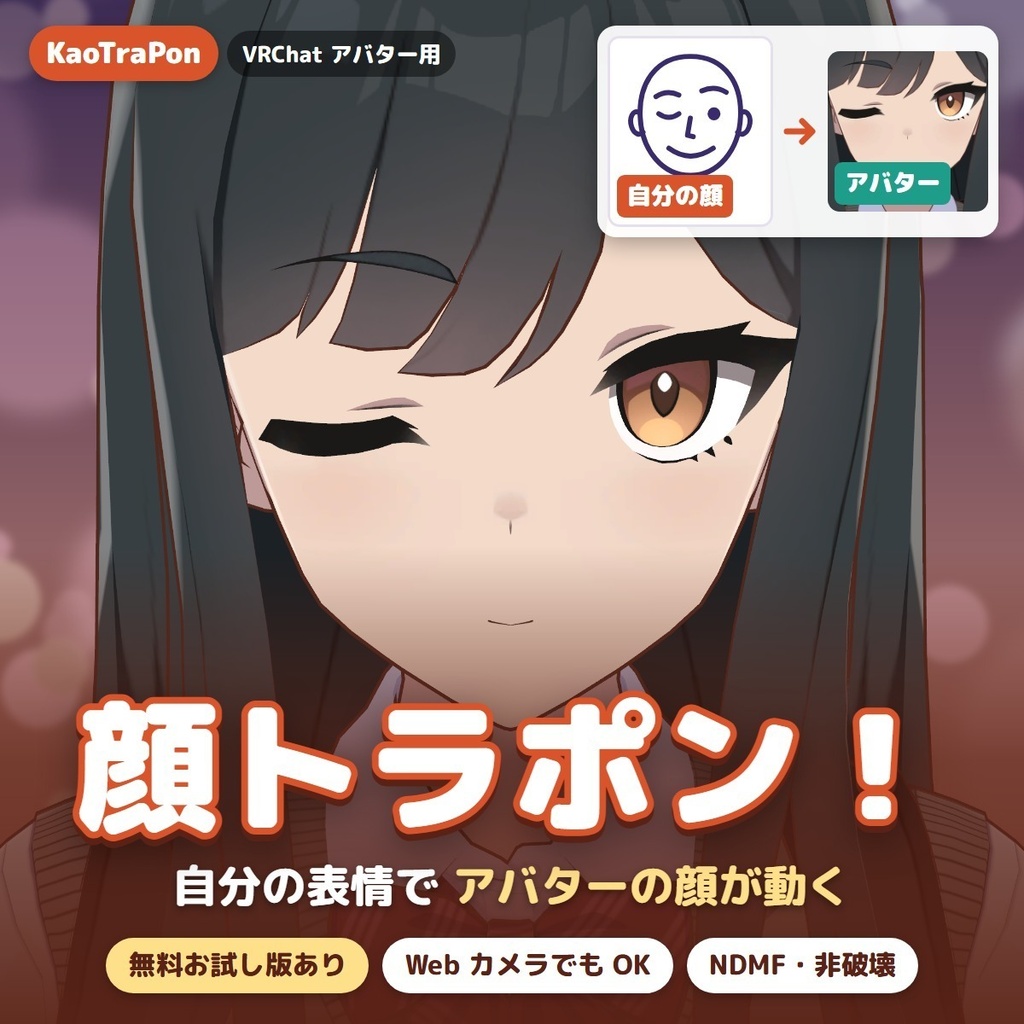
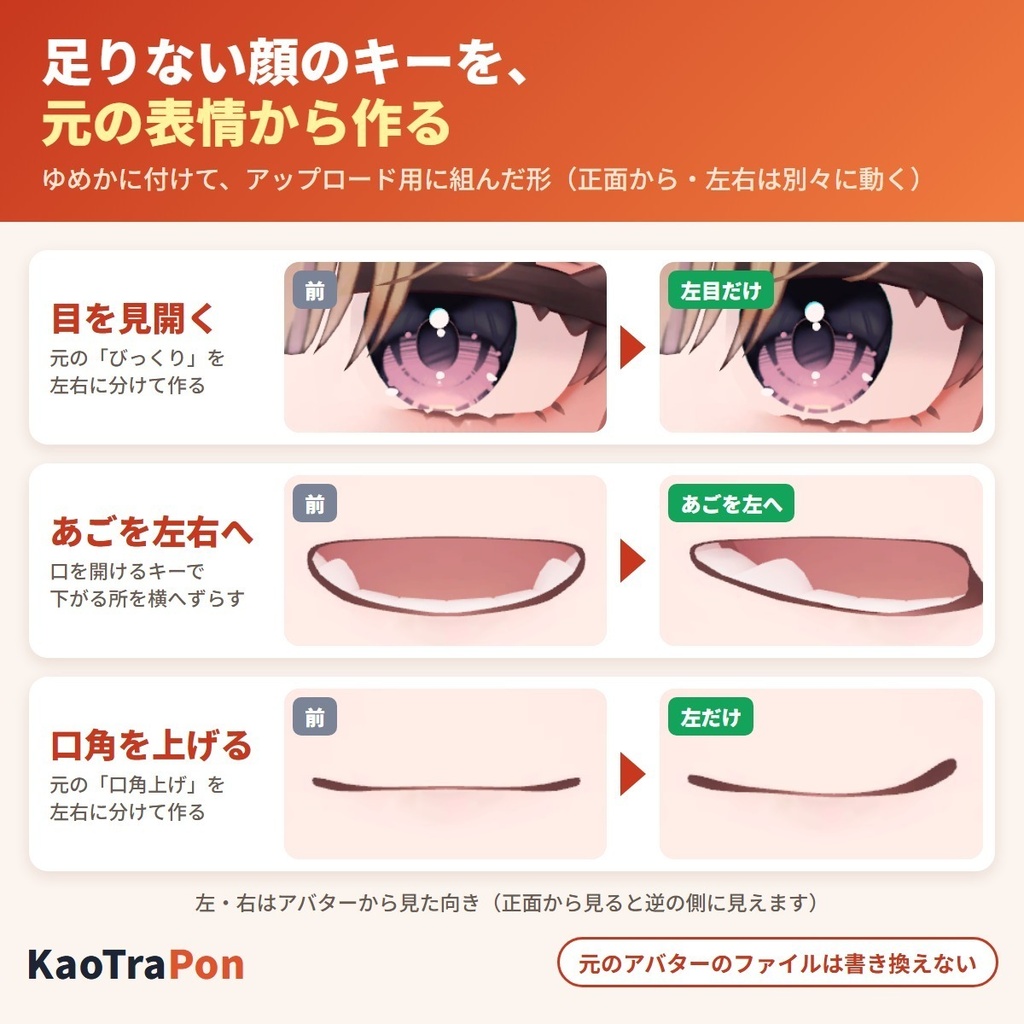
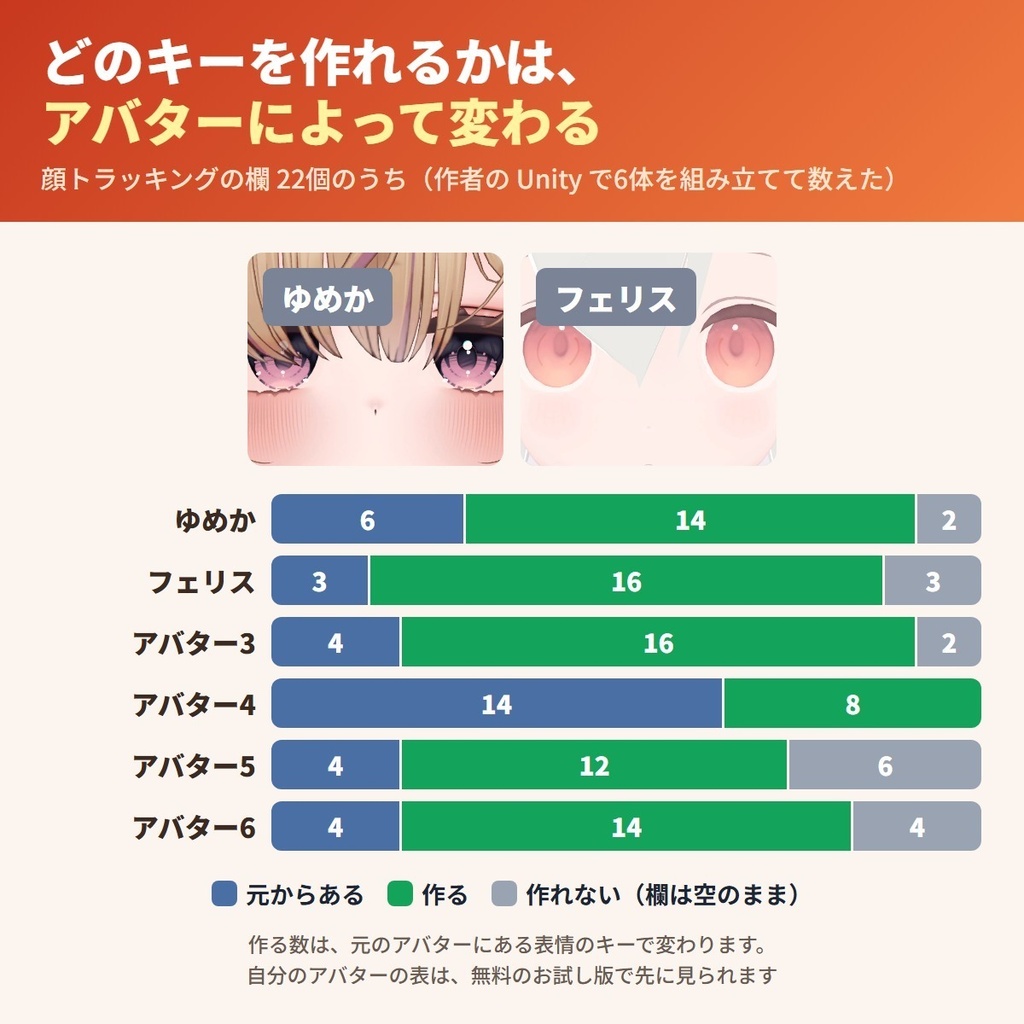
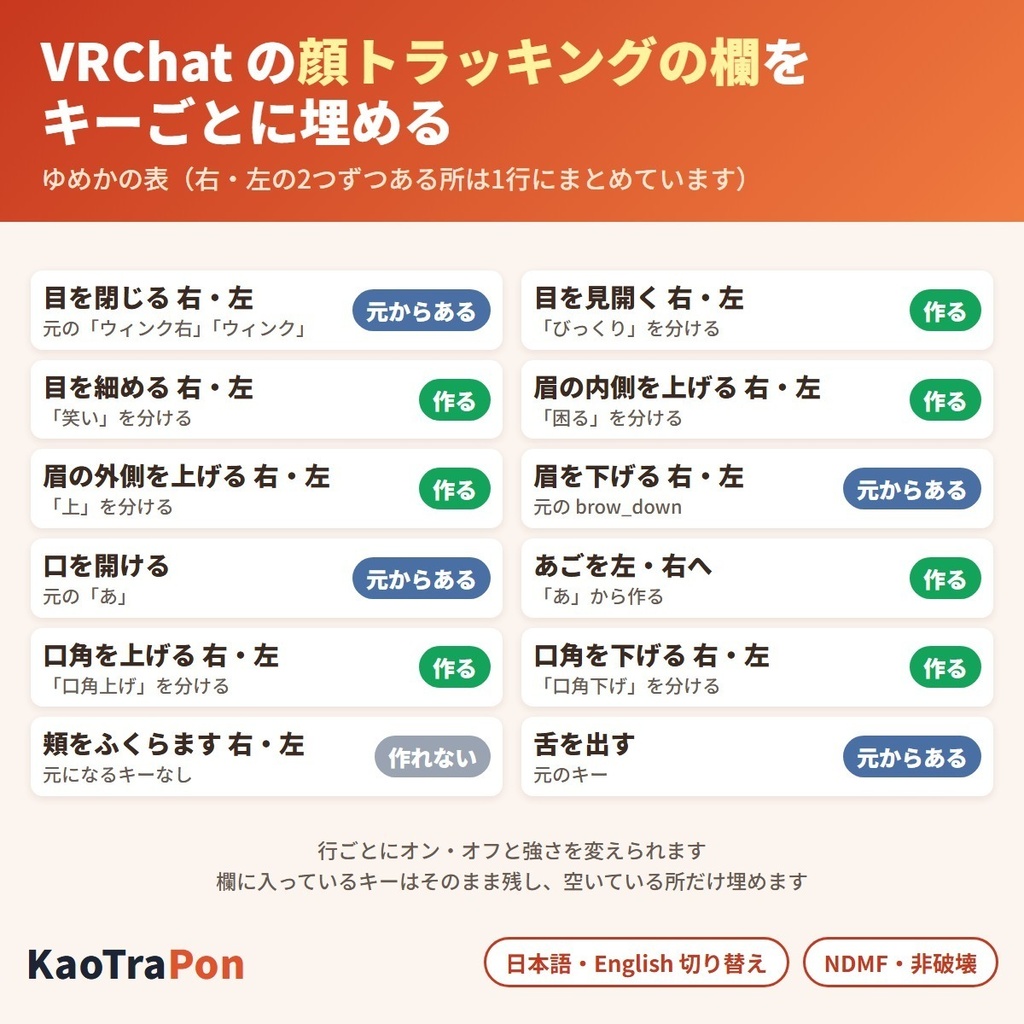
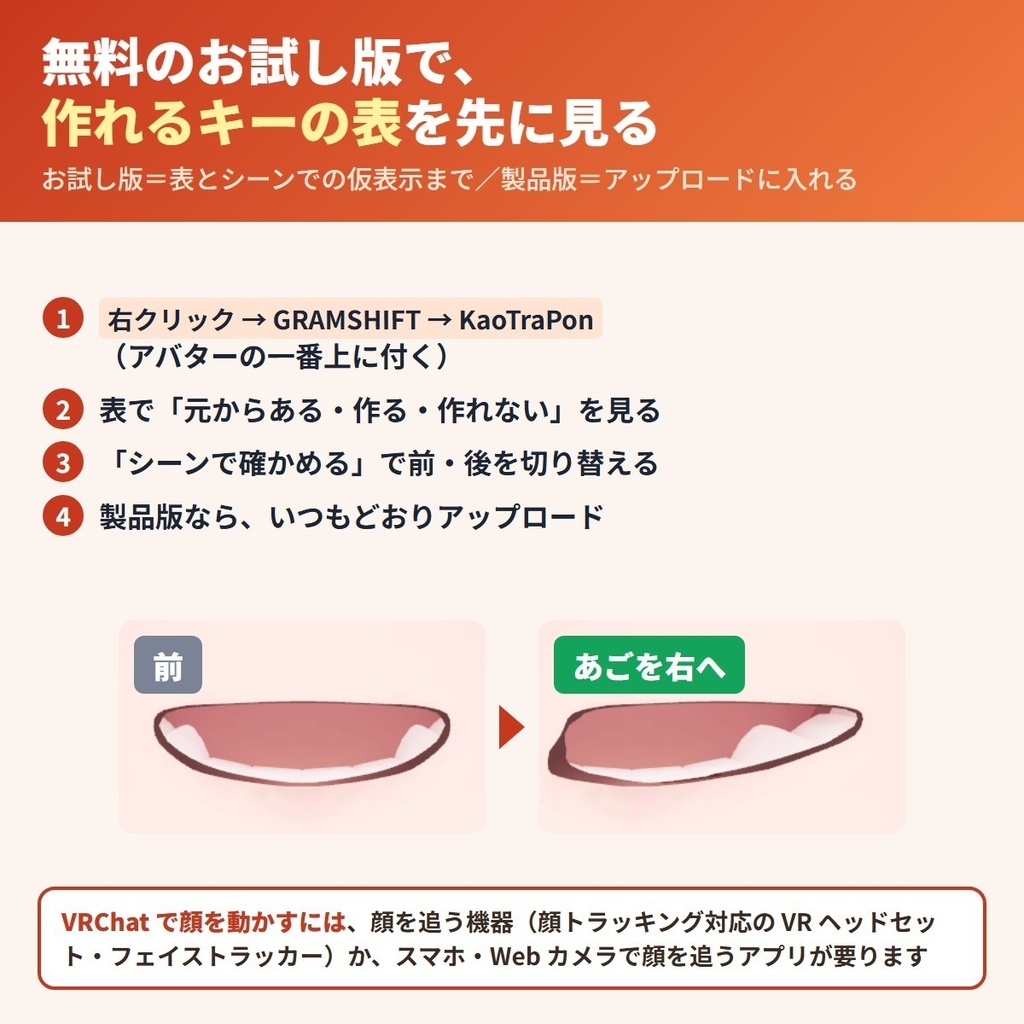
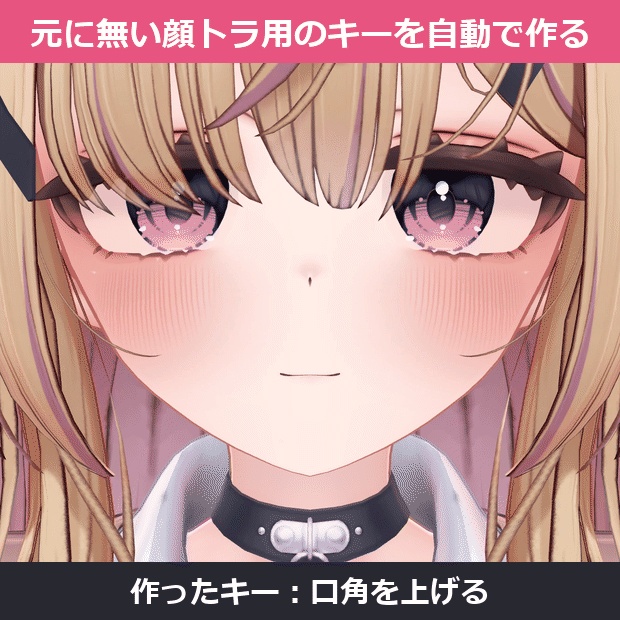
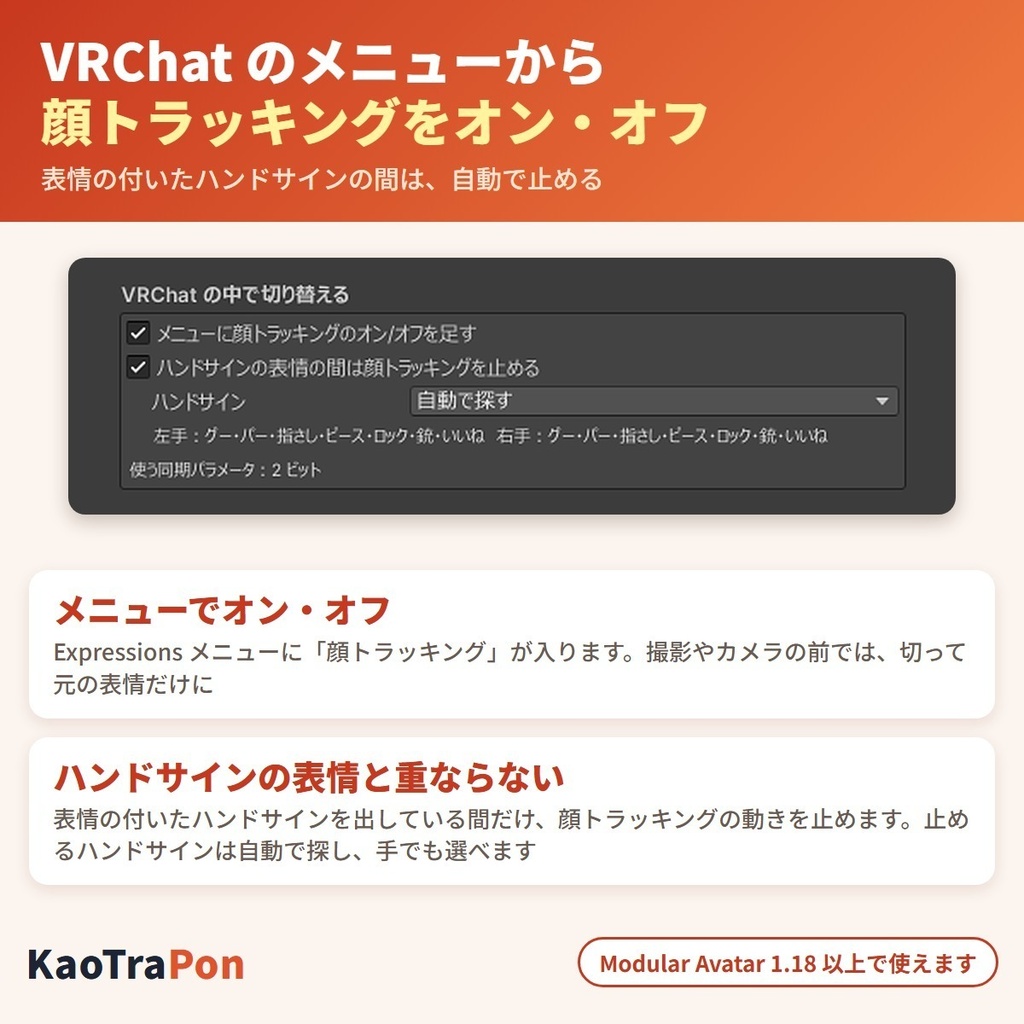
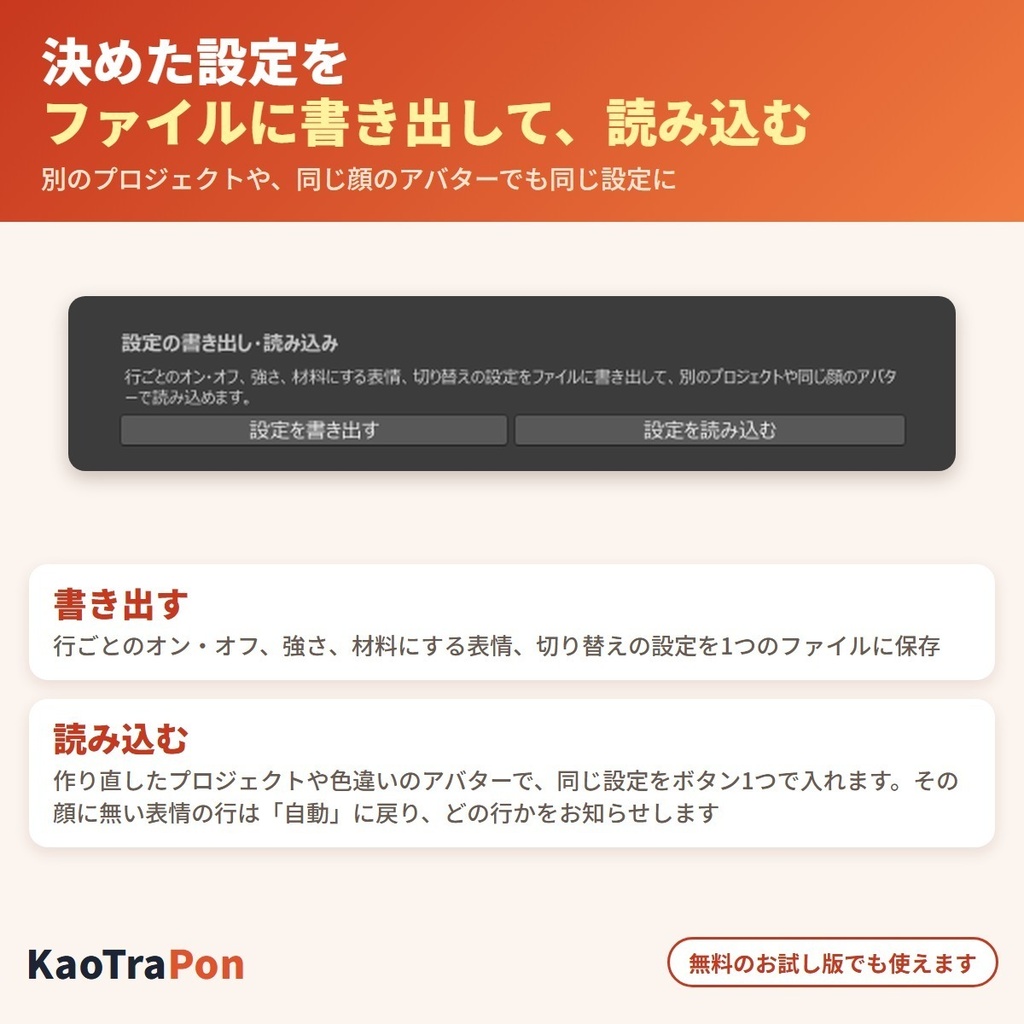
顔トラッキング(FT)に対応していないアバターを、顔トラッキングで動かしたい人へ。足りない表情キー(ウインク・目を見開く・目を細める・眉・口角・あごの左右)を、アバター自身の表情のシェイプキーから作れる分だけ作り、VRChat の顔トラッキングの欄(Avatar Descriptor の Face Tracking)を埋める Unity エディタ拡張です。 作りの違う6体のアバターでは、22個の欄のうち16〜22個が埋まりました(作れる数はアバターで変わります)。アバターの一番上に付けて、いつもどおりアップロードすると入ります。Blender は使わず、元のアバターのファイルは書き換えません(NDMF・非破壊)。 ※ 専用の機器が無くても始められます。VRChat 標準の顔トラッキングは、PC の Web カメラや Android のスマホ・タブレットのカメラでも動きます(VRChat の設定「Tracking & IK」の Camera Tracking)。顔の動きを OSC で送るアプリ・機器からも使えます。この道具が用意するのはアバターの側(キーと欄)です。 無料お試し版あり:自分のアバターで、どの欄が埋まるかの表を先に見られます(製品版 2,500円)。 English / 简体中文 / 한국어:下の段落に説明があります(descriptions below) ■ まずは無料お試し版で、自分のアバターの表を見る ・お試し版(無料):どのキーが「元からある・作る・作れない」かの表と、シーンでの仮表示まで。アップロードしたアバターには入りません ・製品版(2,500円):上に加えて、作ったキーと顔トラッキングの欄をアップロードしたアバターに入れます。お試し版を入れている時は、その上から製品版を入れるだけです 作れるキーの数はアバターによって変わります。買う前に、お試し版の表で自分のアバターの分を確かめてください。 ■ できること ・顔トラッキングの欄 22個を1つずつ見て、「元からある・作る・作れない・もう入っている」を表に出す(作れない時は理由も出ます) ・足りないキーは、元の表情のキー(両目を閉じる・びっくり・笑い・困る・口角上げ・口を開ける など)を左右に分ける・向きを逆にする・横へずらすなどして作る ・あごの左右は、口を開けるキーで下がる所を横へずらして作る。唇の端が引きつれないよう、口の周りはなめらかにつなぐ ・舌を出すキーは、元のアバターにある時にその欄へ入れる ・欄に入っているキーはそのまま残し、空いている所だけ埋める。左右の名前が逆の作りは、動く側で合わせる ・リップシンクのメッシュが顔と同じ時は、リップシンクを顔トラッキングと一緒に使う形(Viseme Blend Shape Face Tracking)にし、あいうえおの割り当てはそのまま引き継ぐ ・行ごとにオン・オフと「強さ」を変えられる ・キーの名前が変わっていて自動で見つからない時は、行ごとの「材料にする表情」で顔のシェイプキーから元の表情を選んで作れる(「使わない」も選べる) ・「シーンで確かめる」で前・後を切り替え、試すキーと動かし具合で、作ったキーの動きをアップロード前に見られる(保存されず、選択を外すと戻る) ・まぶたも顔トラッキングで動かすか選べる(「まぶたも顔トラッキングで動かす」) ・VRChat のメニューから顔トラッキングをオン・オフできる(Modular Avatar を入れている時) ・表情の付いたハンドサインを出している間は、顔トラッキングを自動で止めて、表情が重なって崩れるのを防ぐ(メニューから切れます。止めるハンドサインは自動で探し、手でも選べます) ・設定をファイルに書き出して、別のプロジェクトや同じ顔のアバターで読み込める(行ごとのオン・オフ、強さ、材料にする表情、切り替えの設定) ・顔トラッキングの動きは VRChat 標準の仕組みで他の人に届くので、アバターの同期パラメータの枠を使わない(メニューの切り替えを入れる時だけ 1〜2 ビット) ・日本語/English 切り替え ■ 確かめた結果(作者の Unity の中での試験) 作りの違う6体のアバターで、アップロードした時と同じ組み立てを流して数えました。 ・顔トラッキングの欄 22個のうち、元からある 3〜14・作る 8〜16・作れない 0〜6(埋まった欄は 16〜22)。作る数は、元のアバターにある表情のキーで変わります ・作ったキーは1本ずつ顔に当てて撮り、6体とも見た目が動く(あごの左右は口を開けた形で) ・作れなかった欄は、6体とも空のまま(0 で埋めない) ・6体とも、組み立ての後で元のアバター・Prefab・FBX は変わらない ・4体は、まばたきが Eye Look のまぶたの設定(Blendshapes / Bones)になっていて、知らせ(まばたきは Eye Look のまぶたの設定が使われます)が出ました ・ゆめか:Unity の再生中に、欄の4つのキー(うち3つは作ったキー)の値を 0→0.5→1 と上げると、値に合わせて顔が動く ■ 使う前に ・アバターの規約で、シェイプキーを足す改変が許されているか確かめてください ■ 使い方 1. NDMF 1.14 以上(Modular Avatar を VCC / ALCOM から入れると一緒に入ります)を入れてから、unitypackage をプロジェクトに入れる 2. ヒエラルキーでアバターの一番上(VRC Avatar Descriptor の付いた物)を右クリック → GRAMSHIFT → KaoTraPon(Add Component → GRAMSHIFT → KaoTraPon でも付きます) 3. 表で、どのキーを作るかを確かめ、「シーンで確かめる」で動きを見る 4. 「まばたきは Eye Look のまぶたの設定が使われます」と出たら、目を閉じる・ウインクも顔トラッキングで動かす時は「まぶたも顔トラッキングで動かす」をオンにする 5. VRChat の中で切り替えたい時は、「VRChat の中で切り替える」の2つをオンのままにする(この2つは Modular Avatar 1.18 以上で使えます。同期パラメータを 1〜2 ビット使います) 6. いつもどおりアップロードする ■ 動作環境 ・Unity 2022.3 / VRChat SDK3 Avatars(顔トラッキングの欄がある版)/ NDMF 1.14 以上(Modular Avatar に含まれます) ・作者が試した版:Unity 2022.3.22f1 / SDK Avatars 3.10.6 / MA 1.18.7 / NDMF 1.14.8 ・メニューからのオン・オフと、ハンドサインの間の止めは、Modular Avatar 1.18 以上を入れている時に使えます ・確認したアバター:ゆめか(Arka_X 様)・フェリス(リュクらぼ 様)・HAOLAN(かなリぁ 様)・RadDollV3(三丁目の魔界 様)ほか2体の6体 ・ほかに、組み立てを流して埋まった欄を数えたアバター(22個のうち):Julius ユリウス(brochiManac 様)20・Lumelana ルメラナ(Murixir workshop 様)18・つみれ(てぐらるしょっぷ 様)15・アルバイ子のヌタチさん(inotushop 様)15・Lapine ラピーヌ(WARPSTORE 様)12・MINIUS ミニウス(brochiManac 様)20・Maromage まろまげ(zuchicorn 様)18・ゆがちゃん(vrcreative-pr 様)11 ■ よくある質問 Q. 顔トラッキング用のキーが無いアバターでも使えますか? A. 使えます。元の表情のキー(まばたき・びっくり・笑い・口角上げ・あいうえお など)から作ります。作れる数はアバターによって変わり、お試し版の表で先に見られます。 Q. 顔トラッキングの機器は要りますか? A. 専用の機器が無くても、VRChat の Camera Tracking(PC の Web カメラ・Android のスマホやタブレットのカメラ)で顔の動きを映せます。顔の動きを OSC で送るアプリ・機器からも使えます。この道具はアバター側の準備をします。 Q. Blender でシェイプキーを作る必要はありますか? A. ありません。Unity の中だけで、アップロードの時に顔のメッシュの写しへ足します。元の FBX・アバター・Prefab は書き換えません。 Q. もう一部のキーを欄に入れています。上書きされますか? A. されません。入っているキーはそのまま残し、空いている欄だけ埋めます。 Q. ハンドサインの表情と顔トラッキングは重なりませんか? A. 表情の付いたハンドサインを出している間は、顔トラッキングの動きを自動で止めます(Modular Avatar を入れている時)。止めるハンドサインは自動で探し、見つからない時は KaoTraPon の「ハンドサイン」の欄を「手で選ぶ」にして選べます。VRChat のメニューから切ることもできます。 Q. 設定を別のプロジェクトや別のアバターに移せますか? A. 移せます。KaoTraPon の「設定を書き出す」でファイルに保存し、移す先で「設定を読み込む」を押します。その顔に無い表情が選ばれていた行は「自動」に戻り、どの行かをお知らせします。 Q. お試し版で何ができますか? A. どのキーが作れるかの表と、シーンでの仮表示までです。アップロードしたアバターには入りません。製品版を入れると入ります(お試し版を入れている時は、その上から入れるだけです)。 ■ 制限 ・元になる表情のキーが無いキーは作れません。その欄は空のままです ・頬をふくらますキーは、元に両頬をふくらますキーがある時だけ左右に分けて作ります ・舌を出すキーは作りません。元のアバターにある時だけ欄に入れます ・目を閉じるキーが片目しか動かさない作りの時は、反対の目のキーは作れません(表に理由が出ます) ・目だけで笑う(口が動かない)笑顔のキーからは、口角のキーを作りません(表に理由が出ます) ・作ったキーの動きは元の表情から作るので、顔トラッキング専用に作られたアバターの動きと同じにはなりません ・Eye Look のまぶたの設定(Blendshapes / Bones)を使っている間は、VRChat はまばたきにそちらを使います。まぶたも顔トラッキングで動かす時は「まぶたも顔トラッキングで動かす」をオンにしてください ・顔トラッキングの欄が無い古い VRChat SDK では、アップロードしたアバターには何も足しません(表と仮表示は使えます)。SDK を更新してください ・お試し版は表とシーンの見た目だけで、アップロードしたアバターには入りません ■ 顔の道具(GRAMSHIFT) ・まばたき LidFit https://booth.pm/ja/items/9014545 ・瞳 IrisFit https://booth.pm/ja/items/9016322 ・口のリップシンク MouthFit https://booth.pm/ja/items/9049948 ・舌を動かす TongueFit https://booth.pm/ja/items/9061168 ■ 困った時は うまく動かない時は、このページの「ショップへのお問い合わせ」から気軽にどうぞ(アバターの名前と、表示された文があると早く調べられます)。 要望の多いものから次の版に入れます。
利用規約
・VRChat などで使うアバターの改変に、個人・法人・商用を問わず使えます ・このツールを使って作ったアバター・改変データの公開・販売に、このツール側の制限はありません(元のアバターの規約に従ってください) ・ツール(製品版・お試し版)の改変・逆コンパイル・解析はできません ・ツールのファイルの再配布・転売・共有、買っていない人への譲渡はできません ・お試し版を製品版の形にして配ること、お試し版の制限を外すための改変はできません ・同梱の「利用規約_Terms.txt」が正です Terms (summary): you may use it to modify avatars for VRChat etc., for personal, corporate or commercial use; this tool puts no limit on publishing or selling avatars or edit data made with it (follow the original avatar's terms); you may not modify, decompile or analyze the tool (full or trial); the tool files may not be redistributed, resold, shared or given to people who did not buy it; you may not turn the trial into the full version or remove its limits. The included "利用規約_Terms.txt" is authoritative.
更新履歴
1.0.4(2026-11)設定をファイルに書き出して、別のプロジェクトや同じ顔のアバターで読み込めるようにしました 1.0.3(2026-11)VRChat のメニューから顔トラッキングをオン・オフできるようにし、表情の付いたハンドサインの間は顔トラッキングを自動で止めるようにしました(Modular Avatar を入れている時) 1.0.2(2026-11)笑顔の表情が目だけを動かす作りのアバターで、口角の行に「材料にする表情」を選ぶ案内が出るようにしました 1.0.1(2026-11)キーの名前が変わっているアバターでも、表の「材料にする表情」で元の表情を選んで作れるようになりました 1.0.0(2026-11)公開 1.0.4 (2026-11) Settings export / import 1.0.3 (2026-11) Face tracking can be turned on and off from the VRChat menu, and it pauses automatically while a hand sign with an expression is held (when Modular Avatar is installed) 1.0.2 (2026-11) Avatars whose smile only moves the eyes: the mouth-corner rows now ask you to pick a source expression 1.0.1 (2026-11) Avatars with different key names: pick the source expression in the table to make the keys 1.0.0 (2026-11) released
English
For anyone who wants to move an avatar without face tracking (FT) support with face tracking: KaoTraPon is a Unity editor extension that makes the expression keys your avatar is missing (wink, eye wide, squint, brows, mouth corners, jaw left/right) from its own expression shape keys, as many as can be made, and fills VRChat's face tracking fields (Face Tracking in the Avatar Descriptor). On 6 avatars with different structures, 16-22 of the 22 fields were filled (how many can be made depends on the avatar). Add it to the top of your avatar and upload as usual. No Blender needed, and your original avatar files are not changed (NDMF, non-destructive). Note: you can start without dedicated hardware. VRChat's built-in face tracking also works with a webcam on a desktop PC or the camera of an Android phone or tablet (Camera Tracking under "Tracking & IK" in the VRChat settings). Apps and devices that send face tracking data over OSC work too. This tool prepares the avatar side (the keys and the fields). Free trial available: see the table of which fields will be filled on your own avatar first (full version 2,500 yen). ■ Try the free trial first ・Trial (free): the table of which keys exist / will be made / cannot be made, and the preview in the Scene. It is not added to uploaded avatars ・Full version (2,500 yen): adds the made keys and the face tracking fields to the uploaded avatar. If you have the trial installed, just import the full version on top How many keys can be made depends on the avatar. Check the table for your avatar with the trial before you buy. ■ What it does ・Checks each of the 22 face tracking fields and shows it as Existing / Make / Cannot make / Already set (with the reason when it cannot be made) ・Missing keys are made from existing expression keys (blink both, surprised, smile, troubled, mouth corners up, mouth open, etc.) by splitting them left/right, reversing them or shifting them sideways ・Jaw left/right is made by shifting the part that the mouth-open key moves down to the side, blended smoothly around the mouth so the lip corners do not tear ・Tongue out is set when the avatar already has a tongue-out key ・Keys already in the fields are kept; only empty fields are filled. Models with swapped left/right names are matched by the side that moves ・When the lip sync mesh is the face, lip sync is set to Viseme Blend Shape Face Tracking and the current viseme assignments are kept ・Each row has an on/off switch and Strength ・When a key is not found automatically (for example the blendshape names are different), pick the source expression for that row from the face mesh blendshapes in "Source expression" ("Don't use" can also be picked) ・Under Check in the scene, switch Before / After and use Test key and Amount to see the made keys before uploading (not saved; it goes back when you deselect) ・Choose whether the eyelids also move by face tracking ("Eyelids by face tracking") ・Turn face tracking on and off from the VRChat menu (when Modular Avatar is installed) ・While you hold a hand sign that has an expression, face tracking pauses automatically so the two expressions do not stack (can be turned off from the menu; the hand signs are found automatically and can also be picked by hand) ・Export settings and import them in another project or avatar ・Face movement is synced by VRChat's built-in face tracking, so it does not use your avatar's synced parameter budget (only the menu switch uses 1 to 2 bits) ・Japanese / English switch ■ Test results (the author's tests inside Unity) We ran the same build as an upload on 6 avatars with different structures. ・Of the 22 face tracking fields: existing 3-14, made 8-16, cannot make 0-6 (16-22 fields filled). How many are made depends on the expression keys the avatar already has ・Each made key was applied to the face and captured one by one; on all 6 avatars the face visibly moves (jaw left/right with the mouth open) ・Fields that could not be made stay empty on all 6 (not filled with 0) ・On all 6, the original avatar, prefab and FBX are unchanged after the build ・On 4 avatars, blinking was set by the Eye Look eyelids (Blendshapes / Bones), and the notice "blinking uses the Eye Look eyelid setting" appeared ・Yumeka: in Unity Play mode, raising 4 keys in the fields (3 of them made keys) from 0 to 0.5 to 1 moves the face with the value ■ Before you start ・Check that the avatar's terms allow adding shape keys ■ How to use 1. Install NDMF 1.14 or later (it comes with Modular Avatar from VCC / ALCOM), then import the unitypackage 2. In the Hierarchy, right-click the top of the avatar (the object with VRC Avatar Descriptor) -> GRAMSHIFT -> KaoTraPon (Add Component -> GRAMSHIFT -> KaoTraPon also works) 3. Check in the table which keys will be made, and see them move with Check in the scene 4. If "blinking uses the Eye Look eyelid setting" appears and you want eye closing and winks to move by face tracking too, turn on "Eyelids by face tracking" 5. To switch inside VRChat, leave the two options under "Switch inside VRChat" on (these two work with Modular Avatar 1.18 or later; they use 1 to 2 bits of synced parameters) 6. Upload as usual ■ Requirements ・Unity 2022.3 / VRChat SDK3 Avatars (a version with the face tracking fields) / NDMF 1.14 or later (included with Modular Avatar) ・Author's versions: Unity 2022.3.22f1 / SDK Avatars 3.10.6 / MA 1.18.7 / NDMF 1.14.8 ・The menu switch and the hand sign pause work when Modular Avatar 1.18 or later is installed ・Avatars checked: Yumeka (Arka_X), Felis (リュクらぼ), HAOLAN (かなリぁ), RadDollV3 (三丁目の魔界) and 2 others, 6 in total ・Also built and counted (fields filled out of 22): Julius (brochiManac) 20, Lumelana (Murixir workshop) 18, Tsumire つみれ (てぐらるしょっぷ) 15, Nutachi-san アルバイ子のヌタチさん (inotushop) 15, Lapine (WARPSTORE) 12, MINIUS (brochiManac) 20, Maromage まろまげ (zuchicorn) 18, Yuga-chan ゆがちゃん (vrcreative-pr) 11 ■ FAQ Q. Does it work on avatars with no face tracking keys? A. Yes. It makes them from the avatar's expression keys (blink, surprised, smile, mouth corners up, visemes, etc.). How many can be made depends on the avatar, and the trial shows the table first. Q. Do I need face tracking hardware? A. No. VRChat's Camera Tracking works with a webcam or an Android phone or tablet camera. OSC apps and devices work too. Q. Do I need to make shape keys in Blender? A. No. Everything happens inside Unity; the keys are added to a copy of the face mesh only during the upload. The original FBX, avatar and prefab are not changed. Q. I already set some keys in the fields. Will they be overwritten? A. No. Keys already set are kept, and only empty fields are filled. Q. Do hand sign expressions clash with face tracking? A. While you hold a hand sign that has an expression, face tracking pauses automatically (when Modular Avatar is installed). The hand signs are found automatically; if none is found, set "Hand signs" in KaoTraPon to "Choose by hand" and pick them. You can also turn this off from the VRChat menu. Q. What can the trial do? A. It shows the table of which keys can be made and the preview in the Scene. It is not added to uploaded avatars. Import the full version on top of the trial to add it. ■ Limitations ・Keys with no source expression cannot be made; those fields stay empty ・Cheek puff left/right is made only from an existing both-cheeks puff key ・Tongue out is not made; it is set only when the avatar already has it ・When the eye-closed key moves only one eye, the other eye's key cannot be made (the table shows why) ・Mouth corner keys are not made from an eyes-only smile that does not move the mouth (the table shows why) ・The made keys come from the existing expressions, so they will not move the same way as an avatar built for face tracking ・While Eye Look eyelids (Blendshapes / Bones) are in use, VRChat uses them for blinking. Turn on "Eyelids by face tracking" to move the eyelids by face tracking too ・With an older VRChat SDK that has no face tracking fields, nothing is added to the upload (the table and the preview still work). Please update the SDK ・The trial covers the table and the Scene preview only, not uploaded avatars ■ Need help? If something does not work, feel free to contact us with "Contact this Shop" on this page (the avatar name and any message shown help us look into it quickly). Requests that many people ask for go into the next version first.
简体中文
想让不支持面部追踪(FT)的模型也能用面部追踪动起来的人:KaoTraPon 是一个 Unity 编辑器扩展,根据 Avatar(模型)自带的表情形态键,尽可能制作其缺少的表情键(单眼眨眼、睁大眼睛、眯眼、眉毛、嘴角、下巴左右),并填入 VRChat 的面部追踪栏位(Avatar Descriptor 中的 Face Tracking)。 在 6 个结构不同的模型上,22 个栏位中填入了 16-22 个(可制作的数量因模型而异)。添加到模型最顶层,照常上传即可。不需要 Blender,不会改写原始模型文件(支持 NDMF,非破坏式)。 ※ 没有专用设备也可以开始。VRChat 自带的面部追踪也可以使用电脑的网络摄像头,或 Android 手机・平板的摄像头(VRChat 设置“Tracking & IK”中的 Camera Tracking)。也可以使用通过 OSC 发送面部追踪数据的应用和设备。本工具准备的是模型一侧(键和栏位)。 提供免费体验版:可先查看你的模型哪些栏位会被填入的表格(正式版 2,500 日元)。 ■ 建议先试用免费体验版 ・体验版(免费):显示哪些键“已有/可制作/无法制作”的表格,以及在场景中的预览。不会加入上传的模型 ・正式版(2,500 日元):除上述外,会把制作的键和面部追踪栏位加入上传的模型。如果已安装体验版,只需在其上方导入正式版即可 可制作的键的数量因模型而异。购买前请先用体验版查看你的模型的表格。 ■ 功能 ・逐一检查 22 个面部追踪栏位,显示为 Existing / Make / Cannot make / Already set(无法制作时会显示原因) ・缺少的键,会根据现有的表情键(双眼闭合、惊讶、笑、困扰、嘴角上扬、张嘴等)通过左右拆分、反转方向或横向平移来制作 ・下巴左右,是把张嘴键中向下移动的部分向侧面平移来制作,并在嘴周围平滑过渡,使嘴角不会被撕裂 ・模型已有伸舌键时,会将其设置到对应栏位 ・栏位中已有的键会保留,只填充空着的栏位。左右名称相反的模型,按实际移动的一侧进行匹配 ・当口型同步网格就是脸部时,口型同步会设为 Viseme Blend Shape Face Tracking,并保留当前的音素分配 ・每一行都有开关和 Strength ・当某个键无法自动找到时(例如 blendshape 名称不同),可在该行的“Source expression”中从脸部网格的 blendshape 里选择源表情来制作(也可以选择“Don't use”) ・在 Check in the scene 中切换 Before / After,并使用 Test key 和 Amount,可在上传前查看制作的键(不会保存;取消选择后恢复原状) ・可选择眼睑是否也由面部追踪驱动(“Eyelids by face tracking”) ・可从 VRChat 的菜单开启/关闭面部追踪(已安装 Modular Avatar 时) ・做出带表情的手势时,会自动暂停面部追踪,避免两种表情叠加而变形(可从菜单关闭。要暂停的手势会自动查找,也可手动选择) ・可将设置导出为文件,并在其他工程或相同脸型的 Avatar 上导入 ・脸部动作通过 VRChat 自带的面部追踪同步,不占用模型的同步参数容量(只有加入菜单开关时使用 1~2 bit) ・日语 / English 切换 ■ 测试结果(作者在 Unity 中的测试) 在 6 个结构不同的模型上运行了与上传时相同的构建。 ・22 个面部追踪栏位中:已有 3-14 个,制作 8-16 个,无法制作 0-6 个(填入的栏位 16-22 个)。制作的数量取决于模型原有的表情键 ・将制作的每个键逐一应用到脸部并截图,6 个模型的脸部都有明显动作(下巴左右在张嘴状态下) ・无法制作的栏位在 6 个模型上都保持为空(不会用 0 填充) ・6 个模型在构建之后,原始模型、Prefab 和 FBX 都没有改变 ・有 4 个模型的眨眼设为 Eye Look 眼睑(Blendshapes / Bones),并显示了提示(blinking uses the Eye Look eyelid setting) ・Yumeka:在 Unity 播放模式中,将栏位中的 4 个键(其中 3 个是制作的键)从 0 提高到 0.5 再到 1,脸部会随数值移动 ■ 使用前须知 ・请确认模型的使用条款允许添加形态键 ■ 使用方法 1. 安装 NDMF 1.14 以上(从 VCC / ALCOM 安装 Modular Avatar 时会一并安装),然后导入 unitypackage 2. 在 Hierarchy 中右键点击模型最顶层(带有 VRC Avatar Descriptor 的物体)-> GRAMSHIFT -> KaoTraPon(Add Component -> GRAMSHIFT -> KaoTraPon 也可以) 3. 在表格中确认将制作哪些键,并用 Check in the scene 查看动作 4. 如果显示“blinking uses the Eye Look eyelid setting”,并希望闭眼和单眼眨眼也由面部追踪驱动,请开启“Eyelids by face tracking” 5. 想在 VRChat 中切换时,请保持“Switch inside VRChat”下的两项开启(这两项在安装了 Modular Avatar 1.18 以上时可用,会使用 1~2 bit 的同步参数) 6. 照常上传 ■ 运行环境 ・Unity 2022.3 / VRChat SDK3 Avatars(带有面部追踪栏位的版本)/ NDMF 1.14 以上(包含在 Modular Avatar 中) ・作者的版本:Unity 2022.3.22f1 / SDK Avatars 3.10.6 / MA 1.18.7 / NDMF 1.14.8 ・菜单开关和手势期间的暂停,在安装了 Modular Avatar 1.18 以上时可用 ・已确认的模型:Yumeka(Arka_X)・Felis(リュクらぼ)・HAOLAN(かなリぁ)・RadDollV3(三丁目の魔界)及另外 2 个,共 6 个 ・另外运行构建并统计了填入栏位数的模型(22 个中):Julius(brochiManac)20・Lumelana(Murixir workshop)18・Tsumire つみれ(てぐらるしょっぷ)15・アルバイ子のヌタチさん(inotushop)15・Lapine(WARPSTORE)12・MINIUS(brochiManac)20・Maromage まろまげ(zuchicorn)18・ゆがちゃん(vrcreative-pr)11 ■ 常见问题 Q. 没有面部追踪键的模型能用吗? A. 能用。会根据模型的表情键(眨眼、惊讶、笑、嘴角上扬、音素等)来制作。可制作的数量因模型而异,体验版会先显示表格。 Q. 需要面部追踪设备吗? A. 没有专用设备也可以。使用 VRChat 的 Camera Tracking(电脑的网络摄像头,或 Android 手机・平板的摄像头)就能显示你的脸部动作。也可以使用通过 OSC 发送面部追踪数据的应用和设备。本工具准备的是模型一侧。 Q. 需要用 Blender 制作形态键吗? A. 不需要。全部在 Unity 中完成,只在上传时把键添加到脸部网格的副本上。不会改写原始 FBX、模型和 Prefab。 Q. 我已经在栏位中设置了一些键,会被覆盖吗? A. 不会。已设置的键会保留,只填充空着的栏位。 Q. 手势的表情会和面部追踪叠加吗? A. 做出带表情的手势时,会自动暂停面部追踪(已安装 Modular Avatar 时)。要暂停的手势会自动查找;找不到时,可将 KaoTraPon 的“Hand signs”栏改为“Choose by hand”后选择。也可以从 VRChat 的菜单关闭此功能。 Q. 体验版能做什么? A. 可显示哪些键能制作的表格,以及在场景中的预览。不会加入上传的模型。在体验版上方导入正式版即可加入。 ■ 限制事项 ・没有来源表情的键无法制作;对应栏位保持为空 ・左右脸颊鼓起键,仅能根据现有的双颊鼓起键制作 ・不会制作伸舌键;仅在模型已有时才设置 ・当闭眼键只移动一只眼睛时,无法制作另一只眼睛的键(表格中会显示原因) ・不会根据只有眼睛在笑、嘴部不动的笑容键制作嘴角键(表格中会显示原因) ・制作的键来自现有表情,因此动作不会与为面部追踪专门制作的模型完全相同 ・使用 Eye Look 眼睑(Blendshapes / Bones)期间,VRChat 会用它们来眨眼。开启“Eyelids by face tracking”可让眼睑也由面部追踪驱动 ・在没有面部追踪栏位的旧版 VRChat SDK 中,不会向上传内容添加任何东西(表格和预览仍可使用)。请更新 SDK ・体验版仅限表格和场景中的预览,不会加入上传的模型 ■ 需要帮助? 如果遇到无法正常使用的情况,欢迎通过本页面的店铺咨询功能与我们联系(附上模型名称和显示的提示信息,有助于我们尽快排查)。 呼声较高的需求会优先加入下一版。
한국어
얼굴 트래킹(FT)을 지원하지 않는 아바타를 얼굴 트래킹으로 움직이고 싶은 분께: KaoTraPon은 아바타에 없는 표정 키(윙크, 눈 크게 뜨기, 눈 가늘게 뜨기, 눈썹, 입꼬리, 턱 좌우)를 아바타 자체의 표정 셰이프 키로 만들 수 있는 만큼 만들어 VRChat의 얼굴 트래킹 항목(Avatar Descriptor의 Face Tracking)을 채우는 Unity 에디터 확장입니다. 구조가 다른 6개의 아바타에서는 22개 항목 중 16~22개가 채워졌습니다(만들 수 있는 수는 아바타에 따라 다릅니다). 아바타 맨 위에 추가하고 평소처럼 업로드하면 들어갑니다. Blender는 필요 없으며 원본 아바타 파일은 수정하지 않습니다(NDMF 지원, 비파괴). ※ 전용 장비가 없어도 시작할 수 있습니다. VRChat 기본 얼굴 트래킹은 PC의 웹캠이나 Android 스마트폰·태블릿의 카메라로도 동작합니다(VRChat 설정 "Tracking & IK"의 Camera Tracking). OSC로 얼굴 트래킹 데이터를 보내는 앱과 장비도 사용할 수 있습니다. 이 도구가 준비하는 것은 아바타 쪽(키와 항목)입니다. 무료 체험판 있음: 내 아바타에서 어떤 항목이 채워지는지 표를 먼저 볼 수 있습니다(정식판 2,500엔). ■ 먼저 무료 체험판으로 사용해 보세요 ・체험판(무료): 어떤 키가 "원래 있음 / 만들 수 있음 / 만들 수 없음"인지 보여 주는 표와 씬 안의 미리보기. 업로드한 아바타에는 들어가지 않습니다 ・정식판(2,500엔): 위에 더해, 만든 키와 얼굴 트래킹 항목을 업로드한 아바타에 넣습니다. 체험판을 넣어 둔 경우에는 그 위에 정식판을 가져오기만 하면 됩니다 만들 수 있는 키의 수는 아바타에 따라 다릅니다. 구매하기 전에 체험판의 표로 내 아바타의 결과를 확인해 주세요. ■ 기능 ・얼굴 트래킹 항목 22개를 하나씩 확인해 Existing / Make / Cannot make / Already set으로 표시(만들 수 없을 때는 이유도 표시) ・부족한 키는 기존 표정 키(양눈 감기, 놀람, 웃음, 곤란, 입꼬리 올리기, 입 벌리기 등)를 좌우로 나누거나, 방향을 뒤집거나, 옆으로 옮겨서 만듭니다 ・턱 좌우는 입 벌리기 키에서 아래로 움직이는 부분을 옆으로 옮겨 만들며, 입꼬리가 찢어지지 않도록 입 주변을 부드럽게 이어 줍니다 ・아바타에 이미 혀 내밀기 키가 있으면 그 항목에 설정합니다 ・항목에 이미 들어 있는 키는 그대로 두고 비어 있는 항목만 채웁니다. 좌우 이름이 뒤바뀐 모델은 실제로 움직이는 쪽을 기준으로 맞춥니다 ・립싱크 메시가 얼굴일 때는 립싱크를 Viseme Blend Shape Face Tracking으로 설정하고 현재의 비젬 할당은 그대로 유지합니다 ・각 행마다 켜기/끄기 스위치와 Strength가 있습니다 ・키가 자동으로 찾아지지 않을 때(예: 블렌드셰이프 이름이 다른 경우)는 각 행의 "Source expression"에서 얼굴 메시의 블렌드셰이프 중 원래 표정을 골라 만들 수 있습니다("Don't use"도 선택할 수 있습니다) ・Check in the scene에서 Before / After를 전환하고 Test key와 Amount를 사용해, 만든 키를 업로드 전에 확인할 수 있습니다(저장되지 않으며 선택을 해제하면 돌아갑니다) ・눈꺼풀도 얼굴 트래킹으로 움직일지 선택할 수 있습니다("Eyelids by face tracking") ・VRChat 메뉴에서 얼굴 트래킹을 켜고 끌 수 있습니다(Modular Avatar를 설치한 경우) ・표정이 있는 핸드 사인을 하는 동안에는 얼굴 트래킹을 자동으로 멈춰, 두 표정이 겹쳐 무너지는 것을 막습니다(메뉴에서 끌 수 있습니다. 멈출 핸드 사인은 자동으로 찾으며, 직접 고를 수도 있습니다) ・설정을 파일로 내보내 다른 프로젝트나 같은 얼굴의 아바타에서 불러올 수 있습니다 ・얼굴의 움직임은 VRChat 기본 얼굴 트래킹으로 동기화되므로, 아바타의 동기화 파라미터 용량을 쓰지 않습니다(메뉴 전환을 넣을 때만 1~2비트) ・일본어 / English 전환 ■ 테스트 결과(제작자의 Unity 안 테스트) 구조가 다른 6개의 아바타에서 업로드할 때와 같은 빌드를 실행했습니다. ・얼굴 트래킹 항목 22개 중: 원래 있음 3~14개, 만듦 8~16개, 만들 수 없음 0~6개(채워진 항목 16~22개). 만드는 수는 아바타에 원래 있는 표정 키에 따라 달라집니다 ・만든 키를 하나씩 얼굴에 적용해 캡처한 결과, 6개 아바타 모두 얼굴이 눈에 띄게 움직입니다(턱 좌우는 입을 벌린 상태에서) ・만들 수 없었던 항목은 6개 아바타 모두 빈 채로 남습니다(0으로 채우지 않음) ・6개 아바타 모두 빌드 후에도 원본 아바타, Prefab, FBX는 변경되지 않습니다 ・4개 아바타는 눈 깜빡임이 Eye Look 눈꺼풀 설정(Blendshapes / Bones)으로 되어 있어 안내(blinking uses the Eye Look eyelid setting)가 표시되었습니다 ・Yumeka: Unity 재생 모드에서 항목의 키 4개(그중 3개는 만든 키)를 0에서 0.5, 1로 올리면 값에 맞춰 얼굴이 움직입니다 ■ 시작하기 전에 ・아바타 이용 약관에서 셰이프 키를 추가하는 수정이 허용되는지 확인해 주세요 ■ 사용 방법 1. NDMF 1.14 이상(VCC / ALCOM에서 Modular Avatar를 설치하면 함께 설치됩니다)을 설치한 뒤 unitypackage를 가져옵니다 2. Hierarchy에서 아바타 맨 위(VRC Avatar Descriptor가 있는 오브젝트)를 우클릭 -> GRAMSHIFT -> KaoTraPon (Add Component -> GRAMSHIFT -> KaoTraPon도 가능) 3. 표에서 어떤 키를 만들지 확인하고 Check in the scene으로 움직임을 봅니다 4. "blinking uses the Eye Look eyelid setting"이 표시되고, 눈 감기와 윙크도 얼굴 트래킹으로 움직이려면 "Eyelids by face tracking"을 켭니다 5. VRChat 안에서 전환하려면 "Switch inside VRChat"의 두 항목을 켠 채로 둡니다(이 두 항목은 Modular Avatar 1.18 이상에서 사용할 수 있으며, 동기화 파라미터를 1~2비트 사용합니다) 6. 평소처럼 업로드합니다 ■ 필요 환경 ・Unity 2022.3 / VRChat SDK3 Avatars(얼굴 트래킹 항목이 있는 버전) / NDMF 1.14 이상(Modular Avatar에 포함) ・제작자의 버전: Unity 2022.3.22f1 / SDK Avatars 3.10.6 / MA 1.18.7 / NDMF 1.14.8 ・메뉴 전환과 핸드 사인 중 멈춤은 Modular Avatar 1.18 이상을 설치했을 때 사용할 수 있습니다 ・확인한 아바타: Yumeka(Arka_X)·Felis(リュクらぼ)·HAOLAN(かなリぁ)·RadDollV3(三丁目の魔界) 외 2개, 총 6개 ・그 밖에 빌드를 실행해 채워진 항목 수를 센 아바타(22개 중): Julius(brochiManac) 20·Lumelana(Murixir workshop) 18·Tsumire つみれ(てぐらるしょっぷ) 15·アルバイ子のヌタチさん(inotushop) 15·Lapine(WARPSTORE) 12·MINIUS(brochiManac) 20·Maromage まろまげ(zuchicorn) 18·ゆがちゃん(vrcreative-pr) 11 ■ FAQ Q. 얼굴 트래킹 키가 없는 아바타에서도 쓸 수 있나요? A. 네. 아바타의 표정 키(눈 깜빡임, 놀람, 웃음, 입꼬리 올리기, 비젬 등)로 만듭니다. 만들 수 있는 수는 아바타에 따라 다르며, 체험판이 먼저 표를 보여 줍니다. Q. 얼굴 트래킹 장비가 필요한가요? A. 전용 장비가 없어도 됩니다. VRChat의 Camera Tracking(PC의 웹캠, 또는 Android 스마트폰·태블릿의 카메라)으로 얼굴의 움직임을 보여 줄 수 있습니다. OSC로 얼굴 트래킹 데이터를 보내는 앱과 장비도 사용할 수 있습니다. 이 도구는 아바타 쪽을 준비합니다. Q. Blender로 셰이프 키를 만들어야 하나요? A. 아니요. 모두 Unity 안에서 이루어지며, 업로드할 때만 얼굴 메시의 복사본에 키가 추가됩니다. 원본 FBX·아바타·Prefab은 수정하지 않습니다. Q. 이미 일부 키를 항목에 설정해 두었습니다. 덮어쓰나요? A. 아니요. 이미 설정된 키는 그대로 두고 비어 있는 항목만 채웁니다. Q. 핸드 사인의 표정과 얼굴 트래킹이 겹치지 않나요? A. 표정이 있는 핸드 사인을 하는 동안에는 얼굴 트래킹을 자동으로 멈춥니다(Modular Avatar를 설치한 경우). 멈출 핸드 사인은 자동으로 찾으며, 찾지 못하면 KaoTraPon의 "Hand signs" 항목을 "Choose by hand"로 바꿔 고를 수 있습니다. VRChat 메뉴에서 이 기능을 끌 수도 있습니다. Q. 체험판으로 무엇을 할 수 있나요? A. 어떤 키를 만들 수 있는지 보여 주는 표와 씬 안의 미리보기를 볼 수 있습니다. 업로드한 아바타에는 들어가지 않습니다. 체험판 위에 정식판을 가져오면 들어갑니다. ■ 제한 사항 ・원본이 되는 표정이 없는 키는 만들 수 없으며, 해당 항목은 빈 채로 남습니다 ・볼 부풀리기 좌우 키는 기존의 양볼 부풀리기 키가 있을 때만 만들 수 있습니다 ・혀 내밀기 키는 만들지 않으며, 아바타에 이미 있을 때만 설정합니다 ・눈 감기 키가 한쪽 눈만 움직이는 경우, 반대쪽 눈의 키는 만들 수 없습니다(표에 이유가 표시됩니다) ・입이 움직이지 않고 눈만 웃는 웃음 키로는 입꼬리 키를 만들지 않습니다(표에 이유가 표시됩니다) ・만든 키는 기존 표정에서 만들어지므로, 얼굴 트래킹용으로 제작된 아바타와 똑같이 움직이지는 않습니다 ・Eye Look 눈꺼풀(Blendshapes / Bones)을 사용하는 동안 VRChat은 눈 깜빡임에 그것을 사용합니다. 눈꺼풀도 얼굴 트래킹으로 움직이려면 "Eyelids by face tracking"을 켜 주세요 ・얼굴 트래킹 항목이 없는 오래된 VRChat SDK에서는 업로드에 아무것도 추가되지 않습니다(표와 미리보기는 사용할 수 있습니다). SDK를 업데이트해 주세요 ・체험판은 표와 씬 안의 미리보기까지이며 업로드한 아바타에는 들어가지 않습니다 ■ 도움이 필요하신가요? 제대로 작동하지 않으면 이 페이지의 상점 문의 버튼으로 편하게 문의해 주세요(아바타 이름과 표시된 메시지를 알려 주시면 더 빠르게 확인할 수 있습니다). 요청이 많은 것부터 다음 버전에 반영합니다.