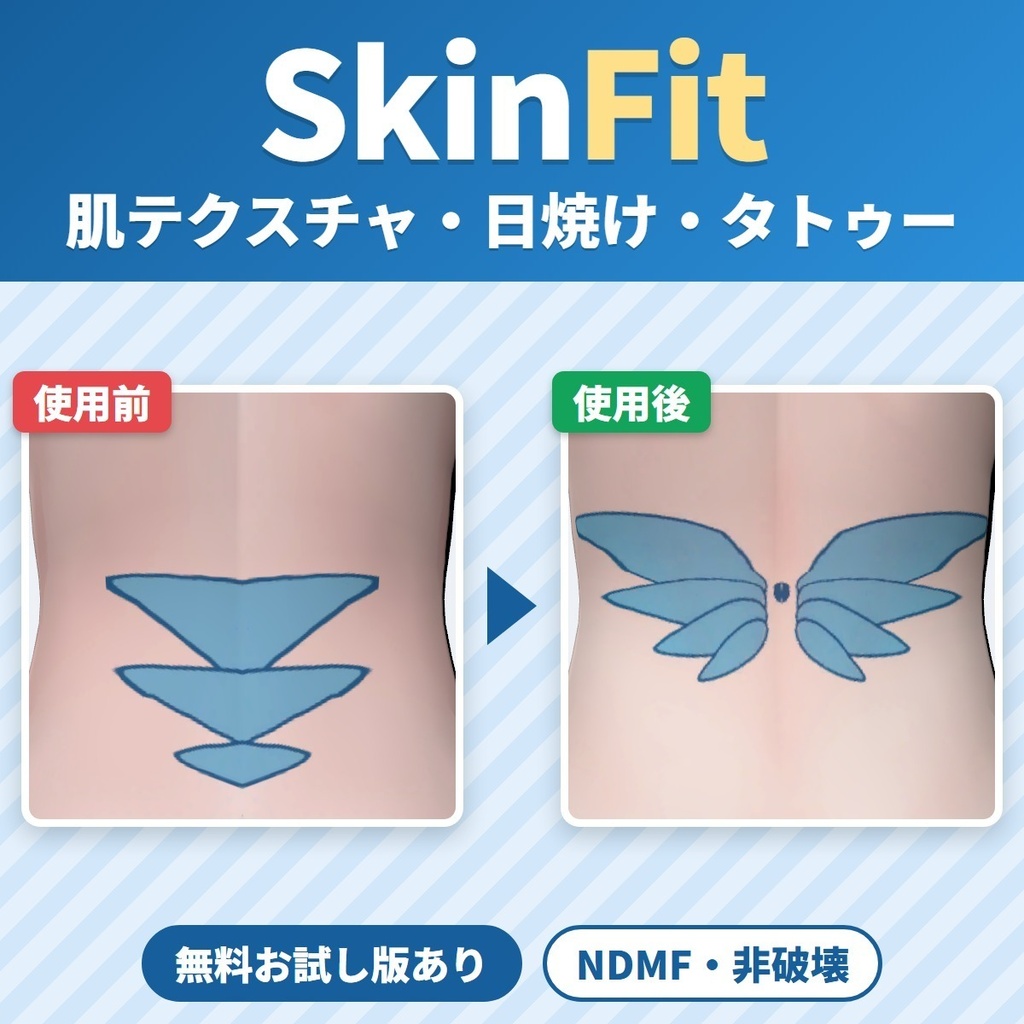
非対応の肌テクスチャ(日焼け跡・タトゥー・陰影)を今のアバターに写すツール SkinFit|別のアバター用の絵を体の同じ所へ【VRChat・NDMF・非破壊】
- ダウンロード商品製品版¥ 1,200
- ダウンロード商品無料お試し版¥ 0無料ダウンロードSkinFit_1.0.1_trial.zip(34.3 KB)SkinFit_1.0.1_trial.zip
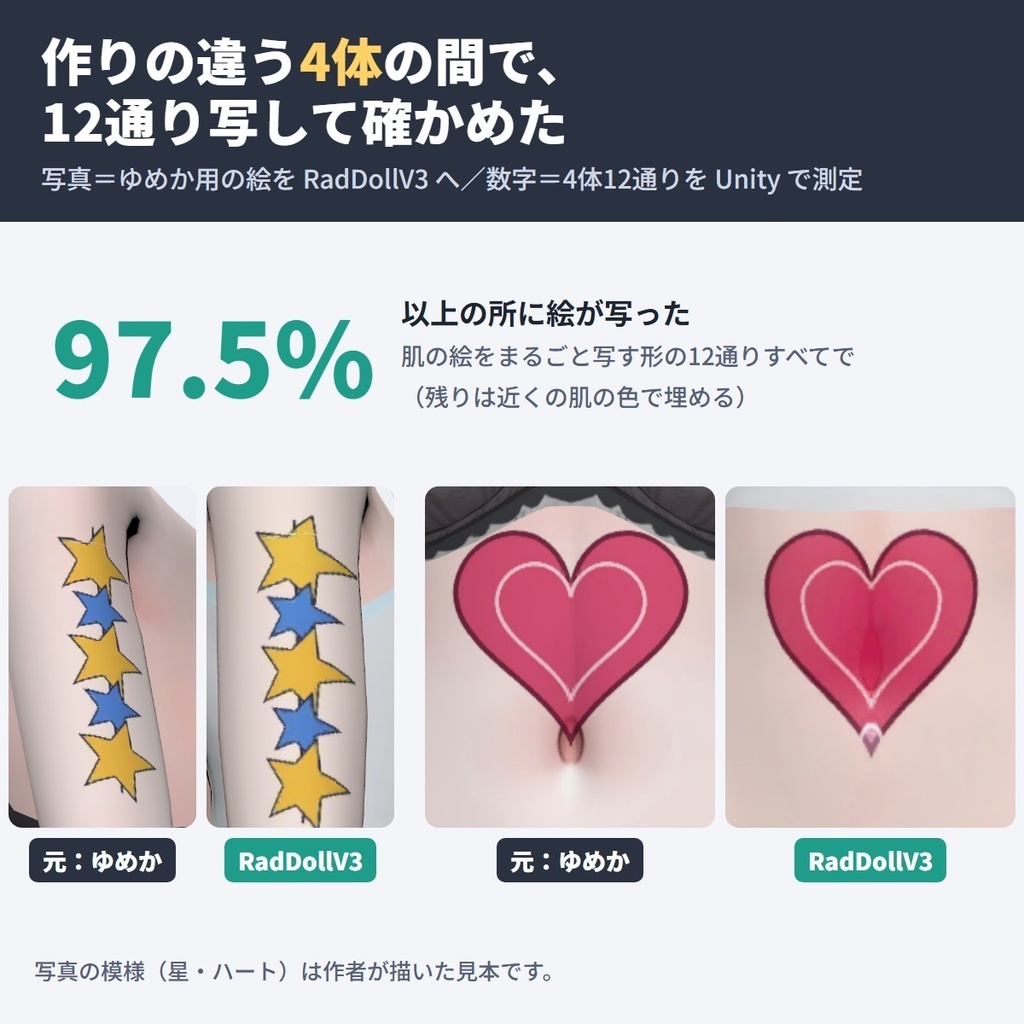
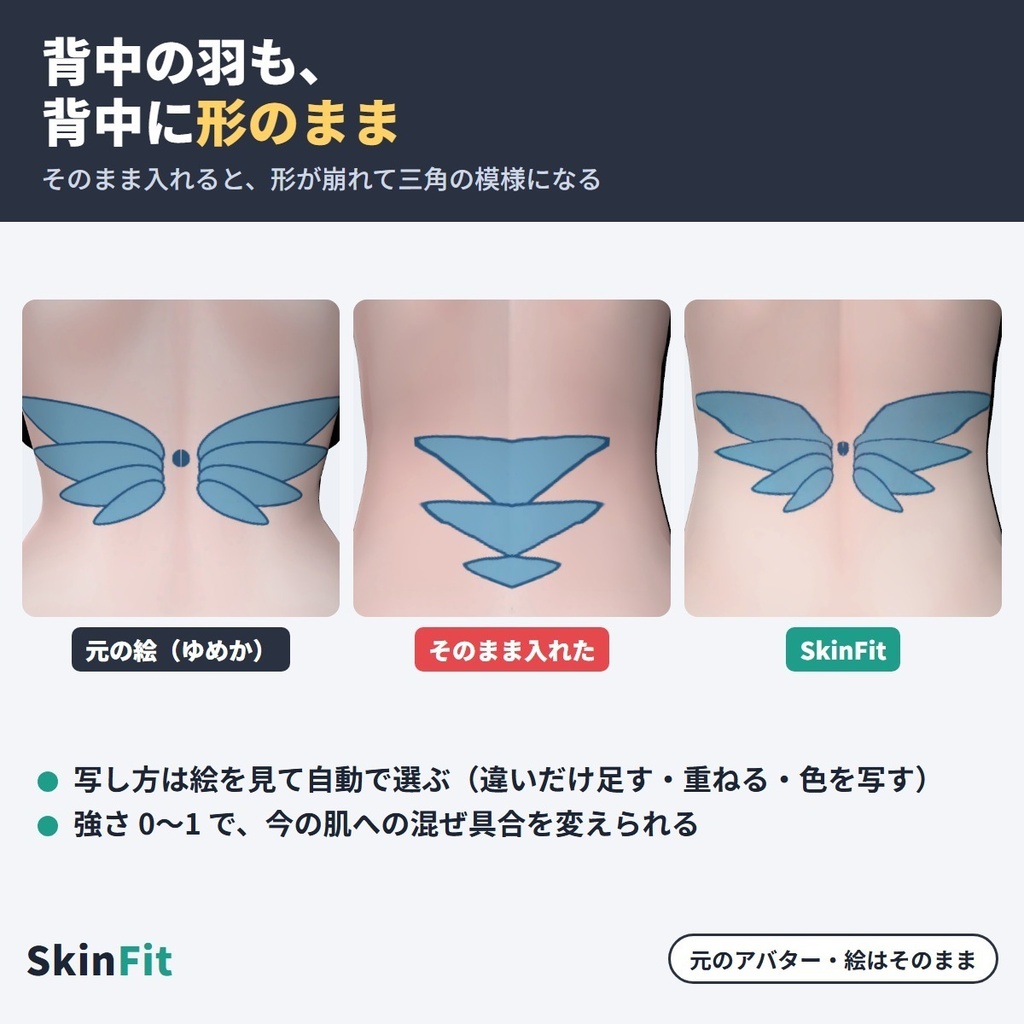
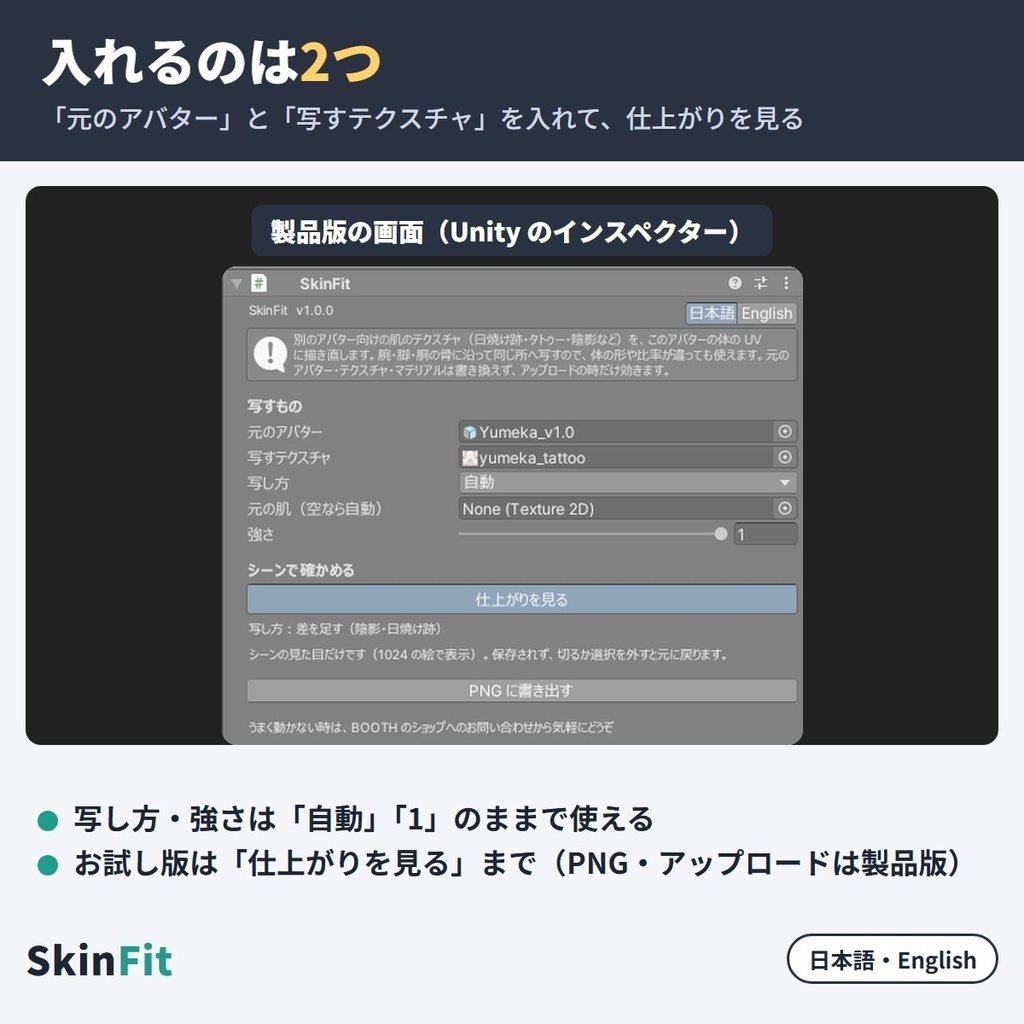
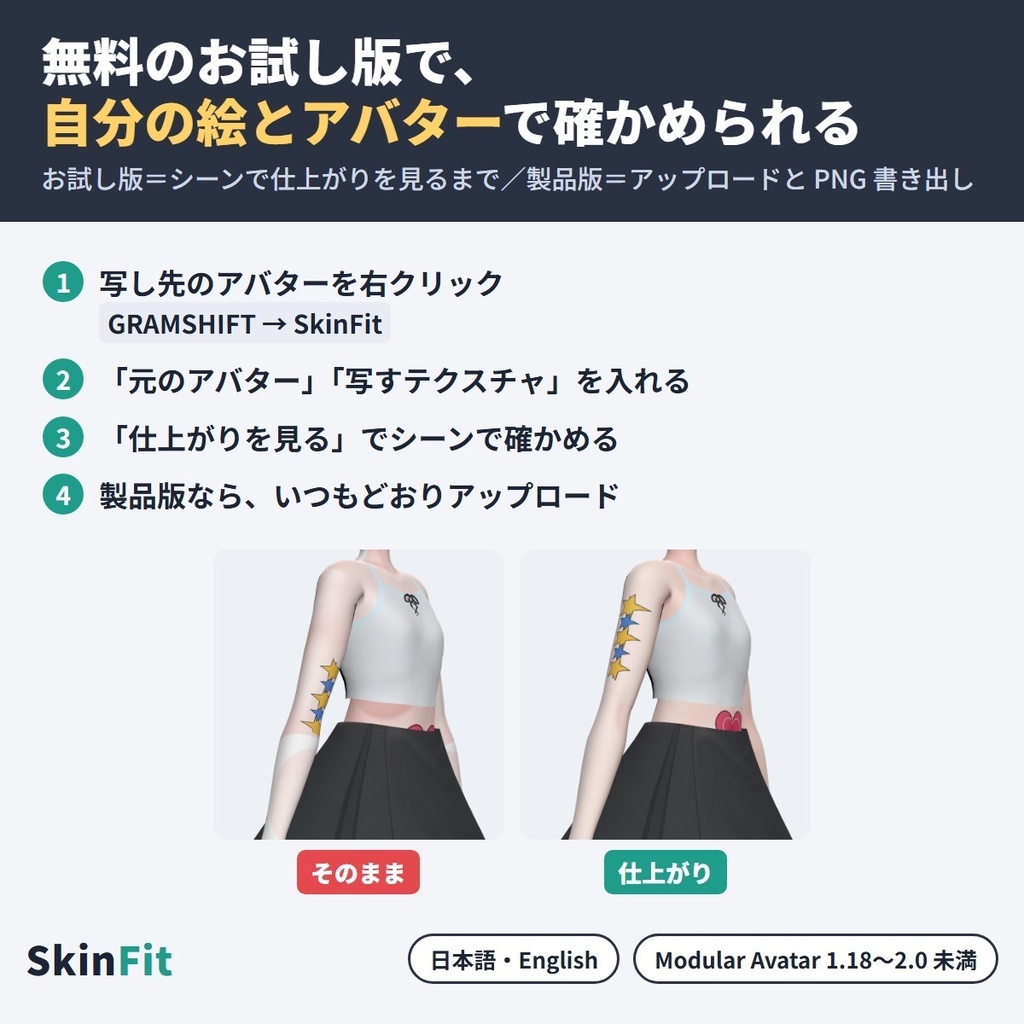
別のアバター向けに作られた肌のテクスチャ(日焼け跡・タトゥー・陰影・全身スーツの柄など)を、今の VRChat アバターの体へ変換して写す(流用する)ツールです。 絵の対応アバター(元のアバター)と写したい絵を選ぶと、UV や体の形・比率が違うアバターにも、肩の模様は肩へ、太ももの模様は太ももへ描き直します(どちらも Humanoid で、体に肌の絵=Main Texture がある物)。 Unity の中だけで使え、元のファイルはそのまま(NDMF・非破壊)。 ■ まずは無料お試し版で、自分の絵とアバターを確かめる 「仕上がりを見る」で、写した姿をシーンで確かめられます(シーンでは一辺1024の絵で表示)。アップロードと PNG への書き出しは製品版で、お試し版の上から入れると切り替わります。 ■ できること ・写し方は自動で選びます:一部だけ違う絵(日焼け跡・陰影)は今の肌の色を残して違いだけを足す/透明な PNG(タトゥー)は肌の上に重ねる/全体が違う絵(全身スーツ)は色を写す。選び直しもできます ・強さ(0〜1)で今の肌への混ぜ具合を変えられます ・いくつも重ねられます(日焼け跡の上にタトゥー、など) ・アップロードの時だけ体の絵を差し替えます ・製品版は写した絵を PNG に書き出せます ・指先・足先など元の絵の外になる所は、近くの肌の色で埋めます ・日本語/English 切り替え ■ 確かめた結果(作者の Unity の中での検査) 作りの違う4体(ゆめか=Arka_X 様・フェリス=リュクらぼ 様・HAOLAN=かなリぁ 様・RadDollV3=三丁目の魔界 様)の間で、元と写し先を入れ替えた12通りで測りました。 ・各アバターの肌の絵をまるごと別の体へ写す形(色を写す)の12通りすべてで、体の 97.5% 以上の所に絵が写りました(残りは近くの肌の色で埋めます) ・体の脇の柄(左の太ももの花・右の腕の星)は、写した3体とも同じ側に写りました ■ 使い方 1. Modular Avatar(1.18 以上 2.0 未満)を入れてから、unitypackage をプロジェクトに入れる 2. 写し先のアバターをヒエラルキーで右クリック → GRAMSHIFT → SkinFit 3. 「元のアバター」に絵の対応アバターのプレハブ、「写すテクスチャ」に絵を入れる 4. 「仕上がりを見る」で確かめて、いつもどおりアップロードする ■ 動作環境 ・Unity 2022.3 / VRChat SDK3 Avatars / Modular Avatar 1.18 以上 2.0 未満(NDMF が一緒に入ります) ・元のアバター・写し先とも Humanoid で、体のメッシュに肌の絵(Main Texture)がある物 ・作者が試した版:Unity 2022.3.22f1 / SDK 3.10.5 / MA 1.18.7 / NDMF 1.14.8 ■ 使う前に ・写すテクスチャとアバターの規約で、改変・流用や、写した絵を配る・売る事が許されているか確かめてください ■ よくある質問 Q. 対応アバターに自分のアバターが無い肌の絵(日焼け跡・タトゥー)を使えますか? A. 使えます。絵の対応アバターを「元のアバター」に入れると、今のアバターの体の同じ所へ写します。 Q. 今の肌の色は変わりますか? A. 日焼け跡・陰影は違いだけを足すので、今の肌の色は残ります。全身スーツの様な全体が違う絵は色ごと写します(写し方「色を写す」)。 Q. 買う前に、自分の絵とアバターで試せますか? A. 試せます。上の無料お試し版で「仕上がりを見る」まで使えます。 ■ 制限 ・作者が確かめたのは Unity の中です。VRChat の中での見た目と実際のアップロードは、まだ確かめていません ・体の比率が違う所では、柄の縦横が伸び縮みします(試した3体の測れた所で、体の大きさに比べ約0.6〜1.3倍。フェリスへ写した小さなハートは縦に約7倍に伸びました) ・全体を暗くした日焼けの絵は「自動」では「色を写す」になります。今の肌の色を残す時は写し方を「差を足す」にしてください ・元のアバターが靴を履いた形のプレハブだと、足先は近くの肌の色になります ・「色を写す」の時、首と手首の境目(頭・手が別の絵の所)に色の差が出ることがあります ・体のメッシュに首の無いアバター(試した中では HAOLAN)は、首まわりが写りません ・顔の絵(メイクなど)は対象外です。体の絵だけを写します ・アップロードの時の絵は今の体の絵と同じ大きさ(4096 を超える時は 4096 に縮め、256 未満は 256)で圧縮して入れます。辺が4の倍数でない時は圧縮しません ・Modular Avatar が無い・範囲外の版の時は働かず、Console に案内が出ます(アバターの組み立ては止めません) ■ Fit シリーズ(Fit series) ・LidFit https://booth.pm/ja/items/9014545 ・IrisFit https://booth.pm/ja/items/9016322 ・NeckFit https://booth.pm/ja/items/9020805 ・WearFit https://booth.pm/ja/items/9032442 ・BandFit https://booth.pm/ja/items/9034318 ■ 困った時は うまく動かない時は、このページの「ショップへのお問い合わせ」から気軽にどうぞ(元と写し先のアバター名と、表示された文があると早く調べられます)。 --- SkinFit transfers skin textures made for another avatar (tan lines, tattoos, shading, full-body suit patterns) to your VRChat avatar's body, including avatars outside the texture's supported list. Pick the avatar the texture was made for and the texture (both Humanoid, with a skin image (Main Texture) on the body): a shoulder pattern lands on the shoulder and a thigh pattern on the thigh, even when UV layouts, body shapes and proportions differ. Runs inside Unity; your files are not changed (NDMF, non-destructive). ■ Try it free with your own texture and avatar The free trial shows the result in the Scene ("Preview result", at 1024 px per side); uploads and PNG export use the full version, imported on top of the trial. ■ Features - Picks the mode automatically: tan lines and shading add only the difference, transparent tattoos are stacked on your skin, full-body suits copy the colours. You can override - Strength 0-1; several layers (tan lines, then a tattoo) - Swaps the body image only at upload - Full version: export the result as a PNG - Japanese/English UI ■ Test results (author's tests inside Unity) 4 avatars with different builds (Yumeka, Felis, HAOLAN, RadDollV3), 12 source/target pairs copying each avatar's whole skin image (Copy colours): the image reached 97.5% or more of the body in all 12 (the rest uses nearby skin colour). Left-thigh and right-arm patterns stayed on the same side on all 3 targets. ■ How to use 1. Install Modular Avatar (1.18 to below 2.0), then import the unitypackage 2. Right-click your avatar in the Hierarchy → GRAMSHIFT → SkinFit 3. Set "Source avatar" (the avatar the texture was made for) and "Texture to transfer" 4. Check with "Preview result", then upload as usual ■ Requirements Unity 2022.3, VRChat SDK3 Avatars, Modular Avatar 1.18 to below 2.0 (with NDMF). Both avatars Humanoid, with a skin image (Main Texture) on the body mesh. Tested: Unity 2022.3.22f1, SDK 3.10.5, MA 1.18.7, NDMF 1.14.8. ■ Before you start Check that the texture's and your avatars' terms allow this, including when you share or sell the result. ■ FAQ Q. Can I use a tan-line or tattoo texture my avatar is not listed for? A. Yes. Set the listed avatar as "Source avatar"; the texture lands on the same parts of your avatar's body. Q. Will my skin colour change? A. Tan lines and shading add only the difference, so it stays; full-body suits copy colours. Q. Can I try it first? A. Yes, with the free trial (up to "Preview result"). ■ Limitations - Checked inside Unity only; not yet in VRChat or by a real upload - Where proportions differ, patterns stretch or shrink (about 0.6-1.3x of body size where measured, 3 avatars; a small heart on Felis stretched about 7x in height) - An all-over darker tan becomes Copy colours under Auto; choose Add the difference to keep your skin colour - If the source prefab wears shoes, the toes take colour from nearby skin - Copy colours can show a colour step at the neck and wrists - Avatars whose body mesh has no neck (HAOLAN among those tested) get nothing around the neck - Face textures (makeup) are not supported - At upload the image takes your body image size (capped at 4096, at least 256) and is compressed; sides not a multiple of 4 stay uncompressed - Without Modular Avatar (or outside the range) SkinFit stays off with a Console notice ■ Need help? If something doesn't work, feel free to contact the shop from this page (include both avatar names and any message shown).
利用規約
・VRChat などで使うアバターの改変に、個人・法人・商用を問わず使えます ・このツールを使って作ったアバター・改変データの公開・販売に、このツール側の制限はありません(写すテクスチャとアバターのそれぞれの規約に従ってください) ・ツールのファイル(製品版・お試し版とも)の改変・逆コンパイル・解析・再配布はできません。お試し版の制限を外す事も含みます ・ツールのファイルの転売・共有・購入した人以外への譲渡もできません ・同梱の「利用規約_Terms.txt」が正です Terms (summary): you may use it to modify avatars for VRChat etc., for personal, corporate or commercial use; this tool puts no limit on publishing or selling avatars or edit data made with it (follow the terms of the texture and of your avatars); you may not modify, decompile, analyze or redistribute the tool files (full version and trial), including removing the trial's limits; the tool files may not be resold, shared or transferred. The included "利用規約_Terms.txt" is authoritative.
更新履歴
1.0.1(2026-10)「仕上がりを見る」で作る写しが、スクリプトの再読み込みの後に残った時も片付けるようにしました(シーンでの見え方とアップロードの結果は変わりません) 1.0.0(2026-10)公開 1.0.1 (2026-10) a copy made by "Preview result" that is left behind after a script reload is now cleaned up (the scene view and the upload are unchanged) 1.0.0 (2026-10) released