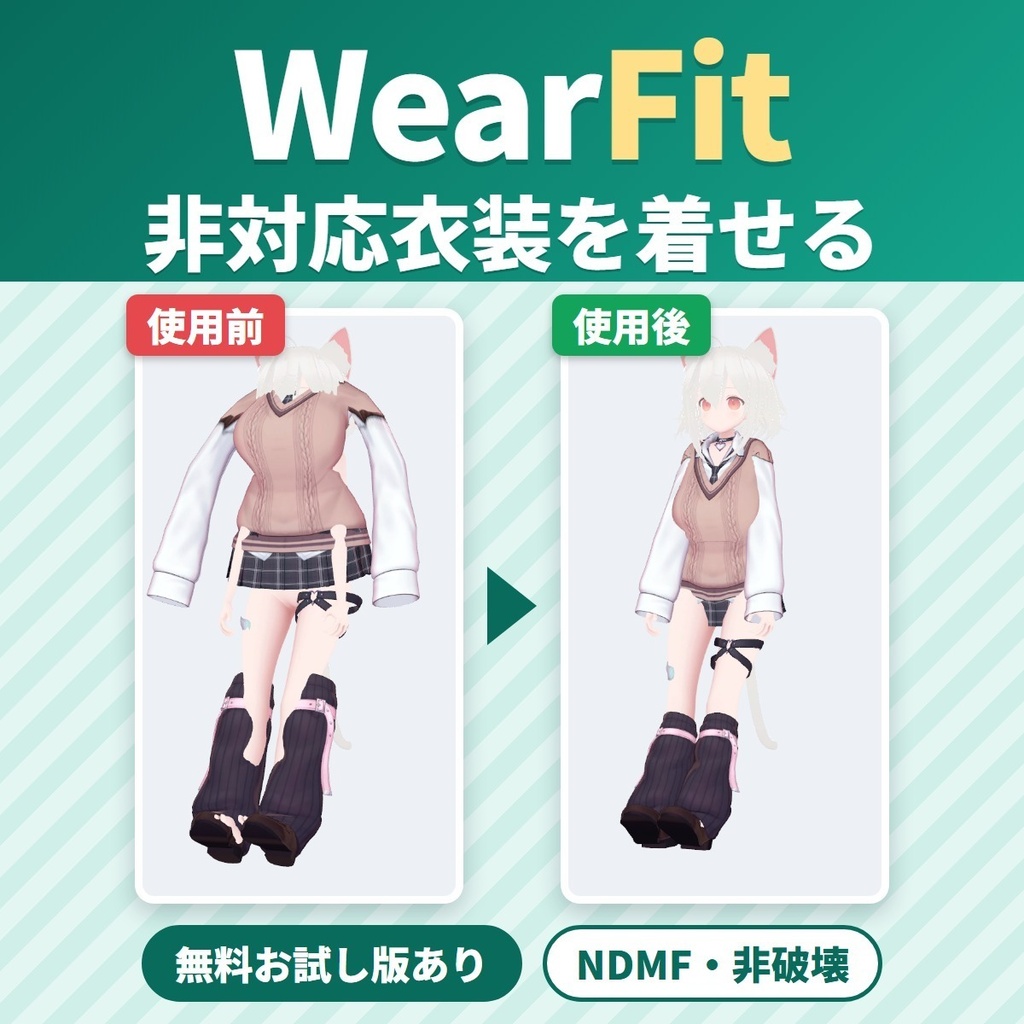
非対応衣装を着せる衣装変換ツール WearFit|プロファイル不要・元のアバターを選ぶだけ・貫通軽減【VRChat・NDMF・非破壊】
- ダウンロード商品製品版¥ 1,800
- ダウンロード商品無料お試し版¥ 0無料ダウンロードWearFit_1.0.1_trial.zip(46.9 KB)WearFit_1.0.1_trial.zip
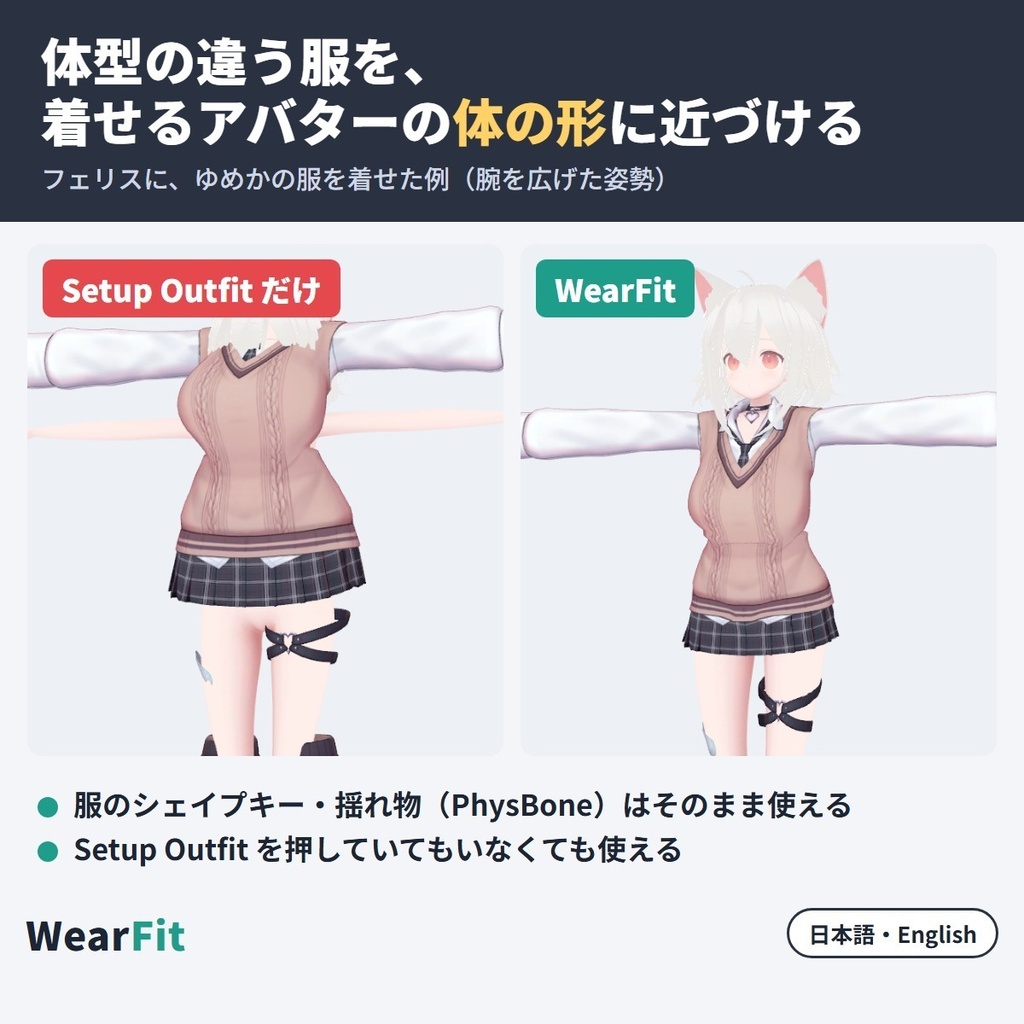
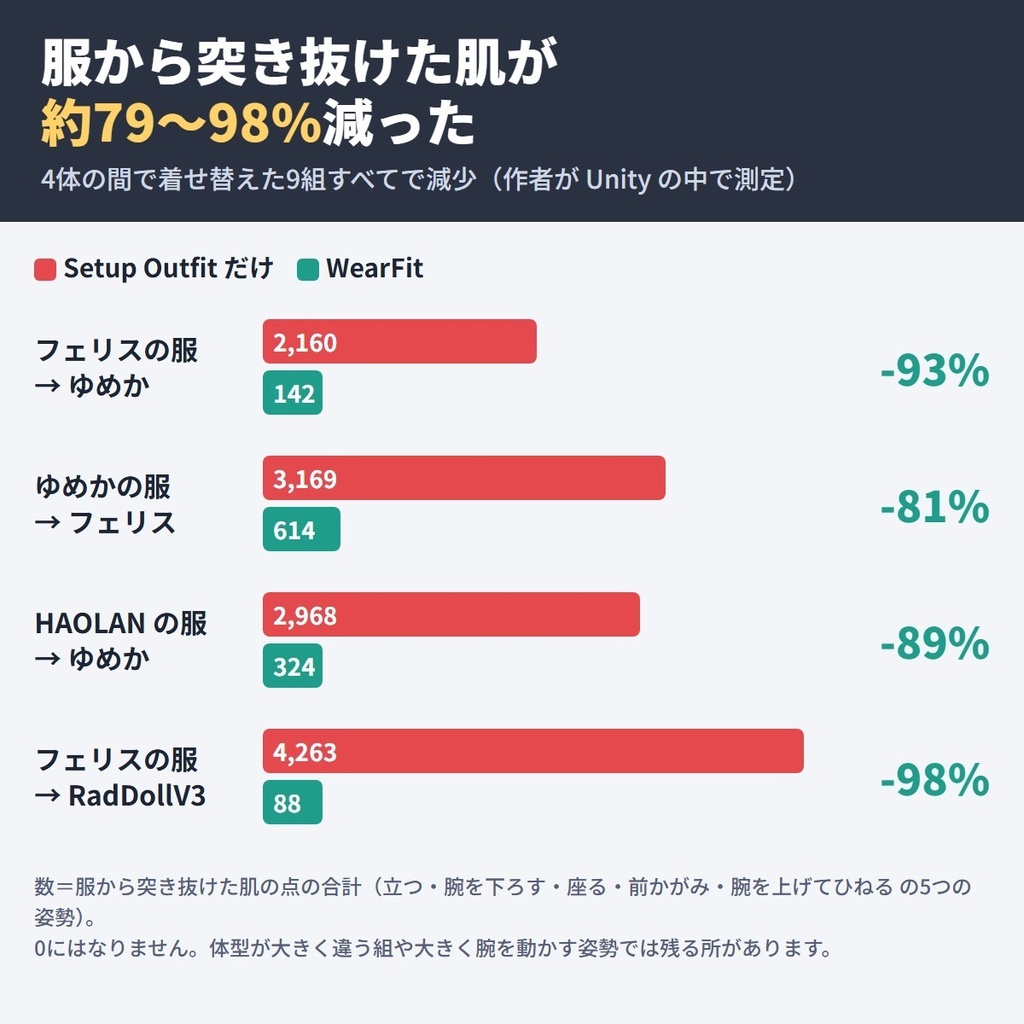
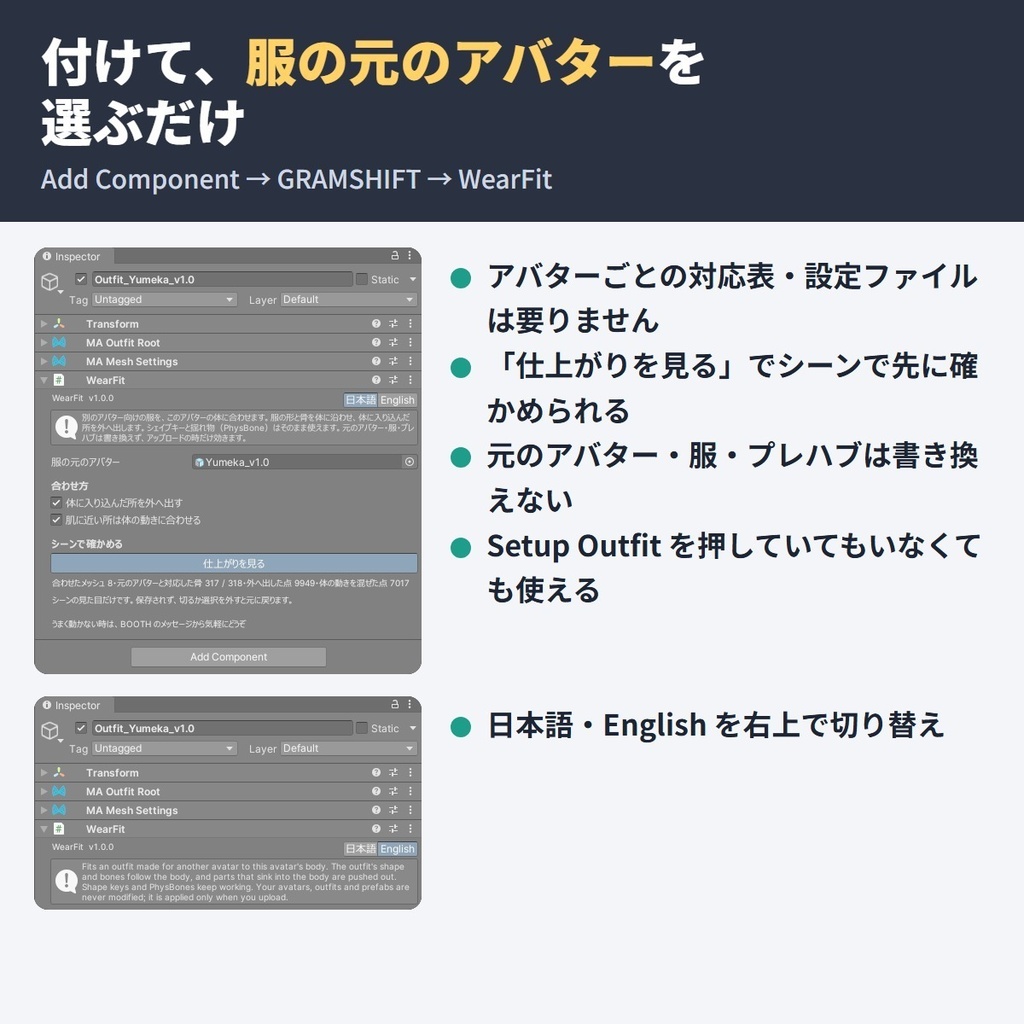
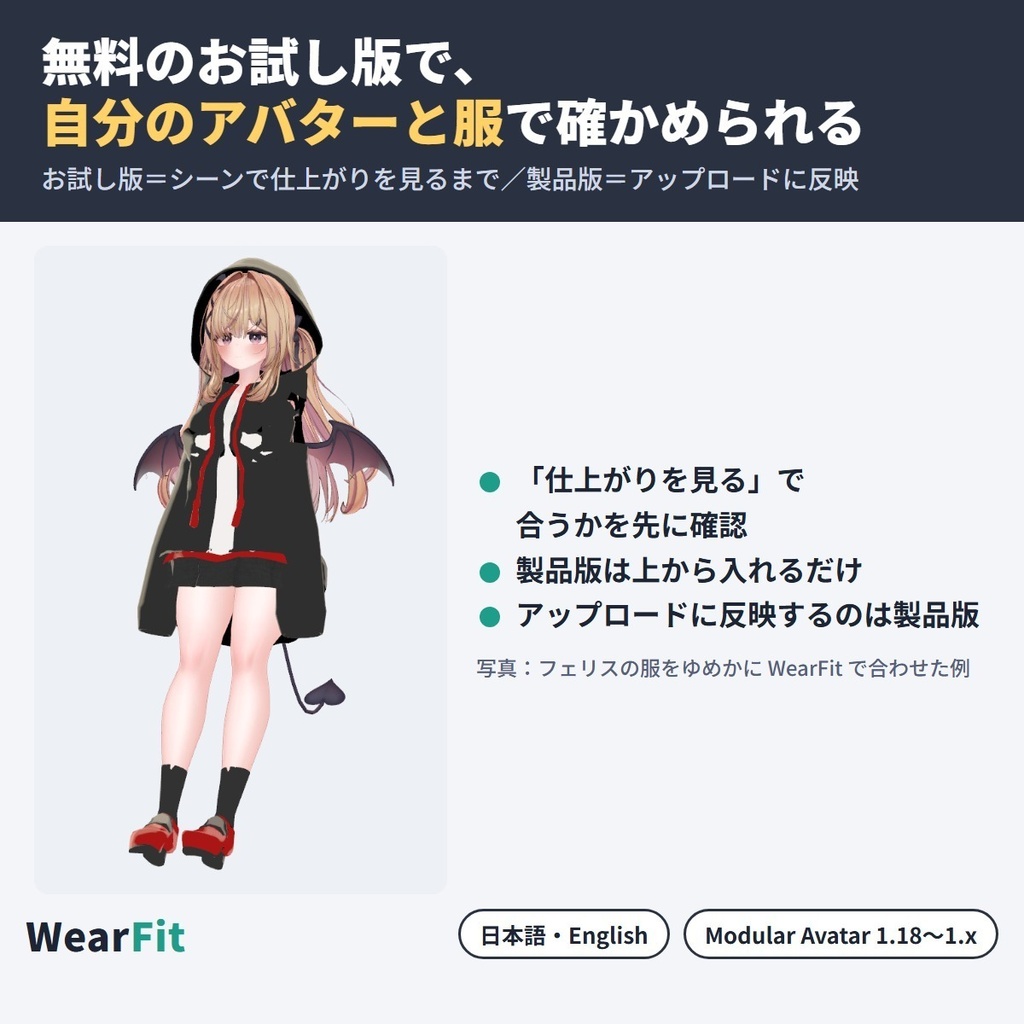
別のアバター用に作られた服(非対応・対応外の衣装)を、いま使っている VRChat アバターの体に合わせて着せ替えられる衣装変換ツールです。 アバターごとのプロファイル(設定ファイル・対応表)なしで、服に WearFit を1つ付けて「その服の元のアバター」を選ぶだけ。アップロードの時に自動で体に合わせ、肌の貫通(突き抜け)を減らします。 服のシェイプキーと揺れもの(PhysBone)も残ります。Unity の中だけで完結します(NDMF・非破壊)。 ■ まずは無料お試し版で、自分の服とアバターを確かめる お試し版では「仕上がりを見る」で合わせた姿をシーンで見られます。気に入ったら製品版をお試し版の上から入れると、アップロードまで使えます。 ■ できること ・アバターごとのプロファイルなし。使うのは「着せるアバター」「服」「服の元のアバター(プレハブのままで可)」の3つだけ ・肌の貫通を減らす(オン/オフ)。元の服で体の中に隠してある裾の裏などはそのまま ・腕を下ろした時・座った時の貫通も減らす(オン/オフ)。スカートや揺れものの所はそのまま ・「仕上がりを見る」でアップロード前にシーンで確かめられます。部品を外せば元の服に戻ります(元のファイルは書き換えません) ・Modular Avatar の Setup Outfit を押した服でも、押していない服でも使えます ・日本語/English 切り替え ■ 確かめた結果(作者の Unity の中での検査) 4体の間で着せ替えた9組を、5つの姿勢(立つ・腕を下ろす・座る・前かがみ・腕を上げてひねる)で測った「服から突き抜けた肌の点」の合計です(Setup Outfit だけ → WearFit)。 ・フェリスの服 → ゆめか:2,160 → 142 ・ゆめかの服 → フェリス:3,169 → 614 ・HAOLAN の服 → ゆめか:2,968 → 324 ・フェリスの服 → RadDollV3:4,263 → 88 ・ほかの5組を含め、9組すべてで減りました(減った割合 約79〜98%) ■ 使い方 1. Modular Avatar(1.18 以上 2.0 未満)を入れてから、unitypackage をプロジェクトに入れる 2. 服をいつもどおり着せるアバターの中に入れる 3. 服の一番上に「Add Component → GRAMSHIFT → WearFit」を付ける(ヒエラルキーの右クリック → GRAMSHIFT → WearFit でも可) 4. 「服の元のアバター」にその服が作られたアバターのプレハブを入れ、「仕上がりを見る」で確かめてアップロードする ■ 動作環境 ・Unity 2022.3 / VRChat SDK3 Avatars / Modular Avatar 1.18 以上 2.0 未満(NDMF が一緒に入ります) ・着せるアバターと服の元のアバターの両方が Humanoid で、体のメッシュがある物 ・服がその元のアバター用に作られている物(服の骨の名前が元のアバターと同じ=Hips・Spine など) ・作者が試した版:Unity 2022.3.22f1 / SDK 3.10.5 / MA 1.18.7 / NDMF 1.14.8 ・確認したアバター:ゆめか(Arka_X 様)・フェリス(リュクらぼ 様)・HAOLAN(かなリぁ 様)・RadDollV3(三丁目の魔界 様)の4体 ・マテリアル・シェーダーは変えません ■ 使う前に ・服の規約で、ほかのアバターへの改変・流用が許されているか確かめてください。服の元のアバターと着せるアバターの規約にも従ってください ・合わせた服のデータは、それぞれの規約が許している場合を除き、配ったり売ったりしないでください ■ よくある質問 Q. 対応していないアバターに服を着せられますか? A. 着せられます。服に WearFit を付けて「服の元のアバター」を選ぶと、アップロードの時に自動で体に合わせます(服がその元のアバター用に作られている事が前提です)。 Q. アバターごとのプロファイル(設定ファイル・対応表)は要りますか? A. 要りません。選ぶのは「服の元のアバター」だけです。 Q. 買う前に、自分の服とアバターで合うか試せますか? A. 試せます。上の無料お試し版で「仕上がりを見る」まで使えます。 Q. 衣装の貫通(肌の突き抜け)を修正できますか? A. 減らせます。作者の検査の数は「確かめた結果」にあります。 Q. 服のシェイプキーや揺れもの(PhysBone)は使えますか? A. 残ります。シェイプキーも揺れものの設定もそのままです(VRChat の中での揺れ方はまだ確かめていません)。 Q. Blender は要りますか? A. 要りません。Unity の中だけで使えます。 Q. どの服・どのアバターでも合いますか? A. 作者が確かめた4体は「動作環境」にあります。体型が大きく違う組や服の作りによっては手直しが要ることがあるので、まずお試し版で確かめてください。 ■ 制限 ・作者が確かめたのは Unity の中です。VRChat の中での見た目・揺れものの動き・実際のアップロードは、まだ確かめていません ・貫通は0にはなりません。体型が大きく違う組や、腕を大きく動かす姿勢では、肌が出る所が残ることがあります ・数えたのは肌の突き抜けだけです。服が体から浮いて見える所が残る・増える組もあります ・服の Shape Changer が元のアバター用のシェイプキー名の時、着せるアバターの体の縮め・隠しは効きません(知らせが出ます) ・もともと着せるアバターの体と一緒に動くメッシュは触りません ・服ごとに WearFit を1つずつ付けてください ・Modular Avatar が無い・範囲外の版の時は働かず、Console に案内が出ます(アバターの組み立ては止めません) ■ Fit シリーズ(Fit series) ・LidFit https://booth.pm/ja/items/9014545 ・IrisFit https://booth.pm/ja/items/9016322 ・NeckFit https://booth.pm/ja/items/9020805 ・BandFit https://booth.pm/ja/items/9034318 ・SkinFit https://booth.pm/ja/items/9034575 ■ 困った時は うまく動かない時は、このページの「ショップへのお問い合わせ」から気軽にどうぞ(服と2つのアバターの名前、表示された文を添えてください)。 --- WearFit fits an outfit made for another avatar (an unsupported outfit) to your VRChat avatar's body. Without per-avatar profiles, settings files or support lists: add WearFit to the outfit, pick the avatar it was made for, and it is fitted automatically at upload, with less skin poke-through. Keeps shape keys and PhysBones. Runs inside Unity (NDMF, non-destructive). ■ Try it free with your own outfit and avatar The free trial shows the fitted outfit in the Scene ("Preview result"); import the full version on top to upload. ■ Features - No per-avatar profiles: uses only your avatar, the outfit and its original avatar (a prefab is fine) - Reduce poke-through (on/off), also with arms down or sitting (on/off); skirts and PhysBone parts are left alone - Scene preview before upload; remove the component to undo - Works with or without Setup Outfit ■ Test results (author's tests inside Unity) 9 pairs across 4 avatars; skin points poking through, summed over 5 poses (stand, arms down, sit, bend, twist with arms up). Setup Outfit only → WearFit: - Felis outfit → Yumeka: 2,160 → 142 - Yumeka outfit → Felis: 3,169 → 614 - 79-98% fewer in all 9 pairs ■ How to use 1. Install Modular Avatar, then import the unitypackage 2. Put the outfit inside your avatar 3. On the top of the outfit: Add Component → GRAMSHIFT → WearFit 4. Set "Original avatar", check with "Preview result", upload ■ Requirements Unity 2022.3, VRChat SDK3 Avatars, Modular Avatar 1.18 to below 2.0. Both avatars Humanoid with a body mesh; the outfit made for its original avatar (same bone names). Tested: Unity 2022.3.22f1, SDK 3.10.5, MA 1.18.7, NDMF 1.14.8. Confirmed avatars: Yumeka (Arka_X), Felis (リュクらぼ), HAOLAN (かなリぁ), RadDollV3 (三丁目の魔界) ■ Before you start Check that the outfit's terms allow use on other avatars, and follow both avatars' terms. Do not share or sell the fitted outfit unless they allow it. ■ FAQ Q. Can I put an outfit on an avatar it does not support? A. Yes. Add WearFit to the outfit and pick its original avatar (the outfit must have been made for that avatar). Q. Do I need a profile or settings file for each avatar? A. No. Q. Does it fit every outfit and avatar? A. Confirmed avatars are listed above. Very different bodies or some outfits may need touch-ups, so try the free trial first. ■ Limitations - Checked inside Unity only; not yet in VRChat or by a real upload - Poke-through is not zero, especially with very different bodies or large arm movements - Only skin poke-through was counted; the outfit may float away from the body in places, in some pairs more than before - A Shape Changer using the original avatar's shape key names does not shrink or hide your body (a notice is shown) - Meshes already moving with your avatar's body are left as they are - One WearFit per outfit - Without Modular Avatar (or outside the range) WearFit stays off with a Console notice ■ Need help? If something does not work, feel free to contact the shop from this page (outfit, both avatar names, any message shown).
利用規約
・VRChat などで使うアバターの改変に、個人・法人・商用を問わず使えます ・このツールを使って作ったアバターの公開・販売に、このツール側の制限はありません(服・服の元のアバター・着せるアバターのそれぞれの規約に従ってください) ・ツールのファイル(製品版・お試し版とも)の改変・逆コンパイル・解析・再配布はできません。お試し版の制限を外す事も含みます ・ツールのファイルの転売・共有もできません ・同梱の「利用規約_Terms.txt」が正です Terms (summary): you may use it to modify avatars for VRChat etc., for personal, corporate or commercial use; this tool puts no limit on publishing or selling avatars made with it (follow the terms of the outfit, the original avatar and your avatar); you may not modify, decompile, analyze or redistribute the tool files (full version and trial), including removing the trial's limits; the tool files may not be resold or shared. The included "利用規約_Terms.txt" is authoritative.
更新履歴
1.0.1(2026-10)アバターをシーンの原点から動かしたり回したりして置いた時に、置き場所で仕上がりが変わることがあったのを直しました(どこに置いても同じ仕上がりになります)。「仕上がりを見る」で作る写しはヒエラルキーに出さず、シーンで写しをクリックすると元のアバターが選ばれます。スクリプトの再読み込みの後に写しが残った時も片付けます 1.0.0(2026-10)公開 1.0.1 (2026-10) the fit no longer changes with where the avatar is placed or how it is rotated in the scene (same result anywhere); the copy made by "Preview result" no longer appears in the Hierarchy, and clicking it in the Scene view selects the original avatar; a copy left behind after a script reload is also cleaned up 1.0.0 (2026-10) released